Hello,
Im trying to get going with API.
I first I tried to create the config.ini with the API key. Then I tried code with KEY directly inside the code.
from dlubal.api import RFEM
with RFEM.Application(api_key_value="KEY") as app:
RuntimeError: gRPC Connection error: UNAUTHENTICATED - The API key is either missing or invalid. Access to the API is denied.
My userID: 901356 and company ID: 581213
Thanks in advance
Hi studentlnu11,
first of all, welcome to our community!
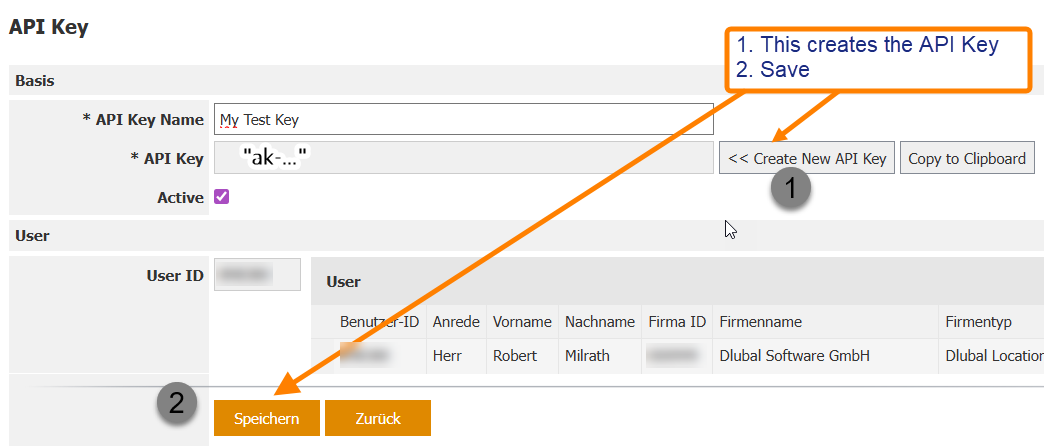
Now lets come to your problem with the API. I just checked your API settings, but it seems that you never created an API-Key, only the API-Key-Name. The API-Key field is empty. You need to create a key in the Extranet first. The format is 'AK-.....'.
Please go into the Extranet again, and create the API-Key-Value.
If you have any further questions, just let me know.
Best regards
Robert Milrath
Thanks for the warm welcoming to the community.
Exactly, I generated the API key from this location multiple times, clipped and pasted into ”KEY” where its explicited in my precious message.
I will try again later today and return,
Thanks in advance
Hi again,
The API key now seems to work for me. After generating the key, make sure you don’t forget to press Save — that solved the issue on my side. Then use the code “AK‑….” directly in the script.
I’m now trying to model a pile divided into n beam elements. However, I’m getting the following error:
RuntimeError: Unexpected error: b"Server raised fault: 'Following Webservice demo restrictions, a maximum of 12 members may be added to a model.'"
I was expecting that using an API key would remove this limitation, since I’m working with a student version. Is this restriction still applied even with a valid student license, or is there something else I need to configure?
Thanks in advance!
Hi studentlnu11,
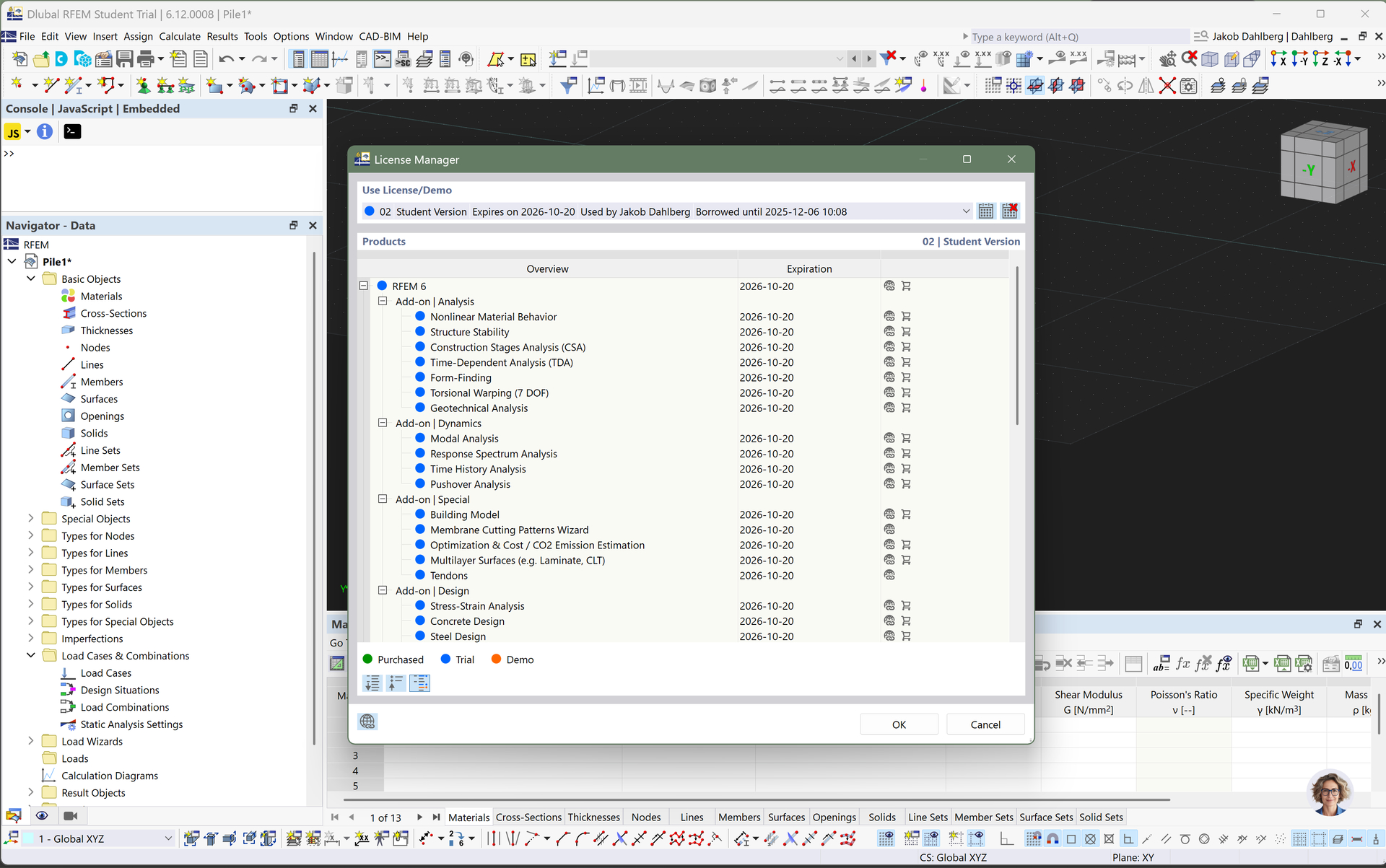
it seems that you're still working with the demo version. Please have a look at RFEM 6 License Type, this will show you how to change from demo to student version.
Best regards
Robert Milrath
Hi,
Inside RFEM6 I have my student version activated.
This is the code that I test the program with:
from dlubal.api import rfem
from RFEM.initModel import Model
from RFEM.BasicObjects.material import Material
from RFEM.BasicObjects.section import Section
from RFEM.BasicObjects.node import Node
from RFEM.BasicObjects.member import Member

if __name__ == '__main__':
    l = float(input('Length of the pile in m: '))
    H = float(input('Horizontal force in kN: '))
    V = float(input('Vertical force in kN: '))
    n_elem = int(input('Number of elements: '))

    # Start RFEM API session with your API key
    with rfem.Application(api_key_value=***) as rfem_app:
        print("Connected to RFEM API successfully!")

        Model(True, "Pile1")
        Model.clientModel.service.delete_all()  # Clear old model
        Model.clientModel.service.begin_modification()

        # Define material and section
        Material(1, 'S235')
        Section(1, 'IPE 200')

        n_nodes = n_elem + 1  # number of nodes along the pile

        # Create nodes
        for i in range(n_nodes):
            z = i * l / (n_nodes - 1)
            Node(i + 1, 0.0, 0.0, z)

        # Create members
        for i in range(1, n_nodes):
            Member(i, i, i + 1, 0, 1, 1)

        # Finish modification
        Model.clientModel.service.finish_modification()
This is what is returned:
Connected to RFEM API successfully!
Connecting to server...
Traceback (most recent call last):
  File "C:\Users\jakob\PycharmProjects\RFEM_Python_Client\MasterThesis\Pile1.py", line 15, in <module>
    with rfem.Application(api_key_value="ak-bdcbface24c94db7ad41323357eba95855adb1f2726b4d9f") as rfem_app:
         ~~~~~~~~~~~~~~~~^^^^^^^^^^^^^^^^^^^^^^^^^^^^^^^^^^^^^^^^^^^^^^^^^^^^^^^^^^^^^^^^^^^^^
  File "C:\Users\jakob\AppData\Local\Programs\Python\.venv\Lib\site-packages\dlubal\api\rfem\application.py", line 92, in __exit__
    raise RuntimeError(f"Unexpected error: {str(exc_value)}") from None
RuntimeError: Unexpected error: b"Server raised fault: 'Following Webservice demo restrictions, a maximum of 12 members may be added to a model.'"
Hi studentlnu11,
never share your API-Key in the community. Please make sure to create a new one and deactivate the old one.
Thank you.
Best regards
Robert Milrath
Hi studentlnu11,
I guess you mixed up the old and the new API. The API-Key is for the API (gRPC), please have a look in the documentation. There you'll find lots of examples, e. g. Cantilever — Dlubal API documentation. They should work as expected, and will help you to understand the usage of the API (gRPC).
Happy coding.
Best regards
Robert Milrath
Hello studentlnu11,
I have removed the API key from your post to prevent any misuse. As my colleague Robert has already mentioned, API keys should never be shared publicly. This key is connected to your account and anyone in the know of this key can use it and cause costs if the limits of your API plan are exceeded.
Best regards,
Clemens Gutmann
I have also deactivated that key ande removed it from my account, so it’s no longer active.
However, I still have the same issue with the element limitation. It seems like the student version does not work with the API, or that the API is still restricted to the demo limits even though I have the student version activated in the client.
I’m sorry — I’m still quite new to this. I followed the documentation more carefully this time, and everything seems to be working now. Thanks for the support!