Dear Dlubal Team,
I would like to suggest a small but very useful improvement for RFEM that could significantly improve workflow efficiency, especially for beginners and frequent users.
When hovering over a command icon in the toolbar, RFEM currently displays the name or description of the command. It would be extremely helpful if the tooltip could also show the associated keyboard shortcut for that command. For example, when hovering over the Copy/Move command, the tooltip could display something like:
Copy/Move (Ctrl+M)
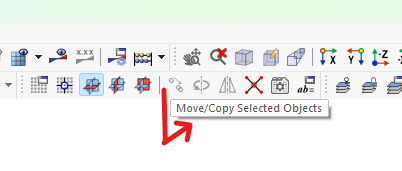
This would make it much easier for users to learn and remember the assigned shortcuts while working. Instead of searching through menus or documentation, users could naturally become familiar with the shortcut keys during daily modelling tasks.
For experienced users, this would help improve modelling speed and efficiency. For complete beginners like myself, it would be a huge boost in learning the software faster and becoming more productive. It would encourage users to make better use of RFEM’s existing shortcut system and would make the overall modelling process smoother and more intuitive.
I believe this feature would be a simple but powerful enhancement to the user interface and would be greatly appreciated by many RFEM users.
Thank you for considering this suggestion.