Hello 
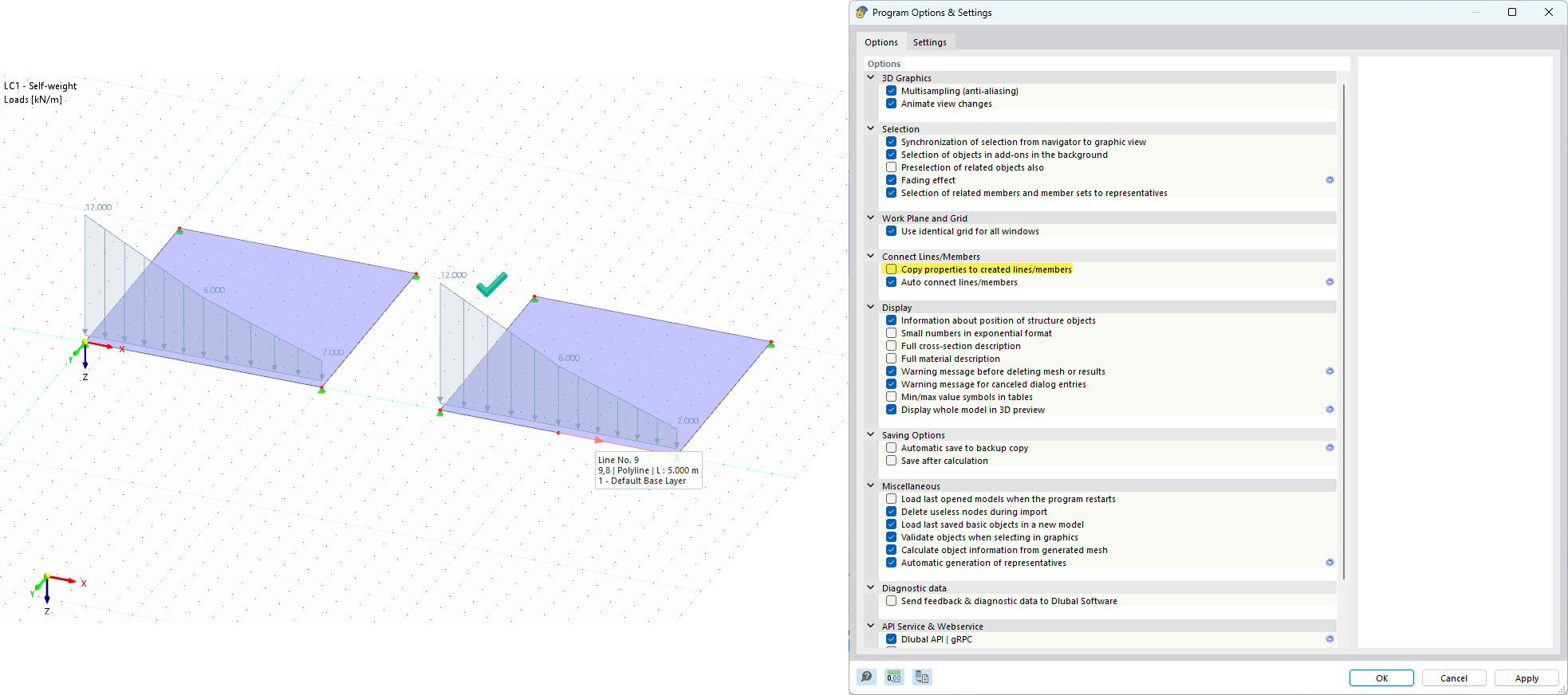
I encountered unexpected program behavior when dividing a line to which a line load with a Varying distribution type is applied.
When dividing such a line using the Connect ... function, the variable load is not “distributed” onto the new lines according to its actual distribution; instead the exact original load is applied to all resulting lines.
This seems non-intuitive (and also very problematic), so I checked the behavior when using the Divide Line tool. This gives a different and expected result.
I also checked RFEM 5, and there it produces the expected result in both approaches.
The above seems like a bug in RFEM 6 (and, to be honest, a step backward compared to RFEM 5).
Can someone confirm that this is not intended behavior in RFEM 6 and that it should be fixed?
Hi r.sajdak,
Thanks for bringing this up! 
Both functions you mentioned serve the same purpose, but the “Connect Lines/ Members” command behaves a bit differently. This is intentional and controlled by a specific setting:
https://www.dlubal.com/en/downloads-and-information/documents/online-manuals/rfem-6/003180
What you can do
-
You can disable this behavior in the Program Options.
-
Once disabled, both functions will react exactly as you expect.
So just to be clear:
 This is not a bug, but designed behavior that can be adjusted as explained.
If you need help finding the option or have further questions, feel free to ask 
Best regards
Stefan Hoffmann
1 Like
Thank you for your answer 
I was not aware of this. This is a direct solution to my problem. 
Additionally I now wonder what else this setting “Copy properties to created lines/members” controls.
From what I’ve checked so far, if I have assigned comments or support and line/member parameters (such as hinges, reinforcement, etc.), they all remain on the created lines.
So what is not copied to the new lines when I use the “Connect” tool? 
Hi r.sajdak,
We don’t have a complete list of all objects affected by this option. However, based on our internal checks, the following objects use different split logic depending on the selected setting:
-
Member Transverse Weld
-
Member Local Section Reduction
-
Effective Lengths
- These are either copied or moved – they are not split
-
Boundary Conditions
- Same behavior as Effective Lengths
-
Concrete Reinforcement
-
Member Imperfection
-
Loads
-
Member Result Intermediate Points
-
Member Section Distribution
-
Member Eccentricities
-
Member End Slope
-
and more
I hope this overview helps you better understand the behavior
If you need details on a specific object or scenario, feel free to ask!
Best regards
Stefan Hoffmann