Good day,
I wanted to ask if there is a way to directly output the results via the API based on the smoothing: Constant in mesh elements.
In principle, all results that are available in the tables can be read out via the API. However, when I try to run the following test code on an already opened model, where the result smoothing: constant in mesh elements was previously selected:
lc_start = 1007
def show_Weld_stresses(RFEM_app, lc_no):
results: common.Table  = rfem_app.get_results(

        results_type=rfem.results.ResultsType.STATIC_ANALYSIS_SURFACES_BASIC_STRESSES_MESH_NODES,

    ).data


results_lc = results[

    (results["loading"] == f"LC{lc_no}") &

    (results["element_no"].isin([6885])) &

    (results["tag"] == f"middle")

]


cols = [

    "loading",

    "surface_no",

    "mesh_node_no",

    "element_no",

    "sigma_x",

    "sigma_y",

    "tau_xy",

    "tau_xz",

    "tau_yz"

]


print("\nResults:\n", results_lc[cols].to_string())
def rechne_kombination(RFEM_app, lc_no):
    rfem_app.calculate_specific(

            loadings=[

                rfem.ObjectId(

                    no=lc_no,

                    object_type=rfem.OBJECT_TYPE_LOAD_CASE

                )

            ],

            skip_warnings=True

        )
def main():
lc_counter = lc_start


with rfem.Application(api_key_value=API_KEY) as rfem_app:

    info = rfem_app.get_application_info()

    print(f'Version: {info.name}')


    rfem_app.get_active_model()     #loads the manual opened model into the here written script


    while lc_counter < 1010:

         rechne_kombination(rfem_app=rfem_app,lc_no=lc_counter)

         show_Weld_stresses(rfem_app=rfem_app,lc_no=lc_counter)

         lc_counter += 1
if name == "main":
main()
So, in my GUI the correct tabular output is displayed and also graphically that of the smoothing constant in the mesh elements, but my terminal outputs the stresses which relate purely to the nodes, i.e. equivalent to the single node results if the result smoothing: “Continuous within surface sets, otherwise within surfaces” had been selected.
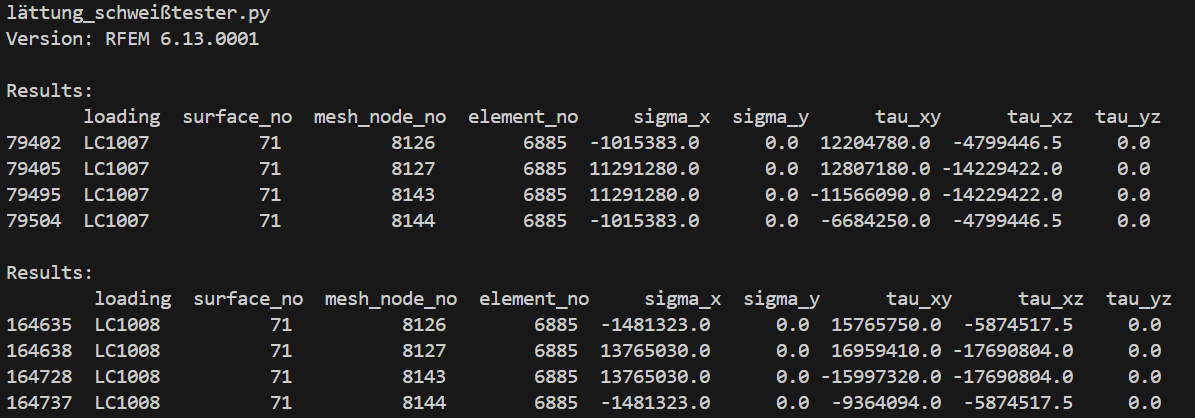
If there is a possibility here that I have not found, I would be very grateful!
If not, I would like to program these results myself; for this I initially took the following article: https://www.dlubal.com/de/support-und-schulungen/support/knowledge-base/001571
Here I read: Constant in Elements
In this variant, all node values of an FE element are averaged and the entire FE element consistently has this value (smoothed).
Unfortunately, I get certain deviations with this approach, as the API outputs the following values for node results in the attached file:
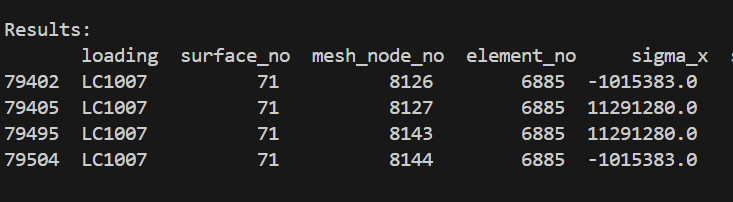
If I now average these, I get the following result:

Unfortunately, there is a deviation of about 6 percent compared to the result that RFEM outputs for the constant smoothing.
The reason for this is now clear to me: the averaging must be based on the raw data of the FE nodes which are output exclusively in the smoothing type “not continuous” and are displayed separately for each node element-specifically.
The problem here is that I cannot access the results of the smoothing settings “not continuous” via the API either; if there are possibilities for this but not for the constant smoothing, it would be great if you could explain this possibility to me.
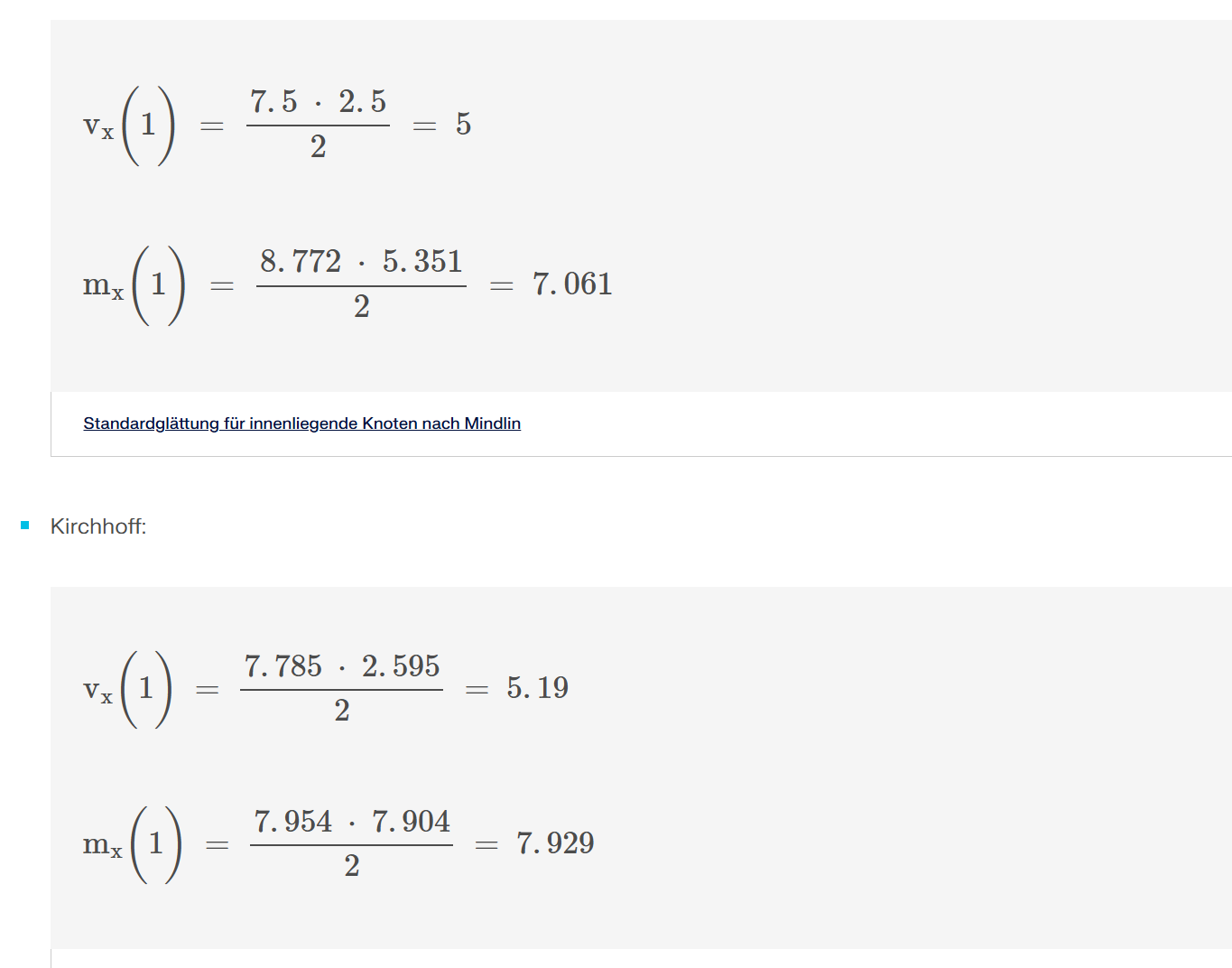
Furthermore, I read this article where I noticed that in the formulas a multiplication symbol was used multiple times where addition was actually meant:
https://www.dlubal.com/de/support-und-schulungen/support/knowledge-base/001606
I would be very pleased to receive feedback.
Best regards,
Nick Böttcher
Welding_reduced.rf6 (2.7 MB)