Good day,
Since I am unable to access results determined by the result smoothing "constant in mesh elements" via the static analysis API, I am now trying this using the Stress-Strain Calculation addon.
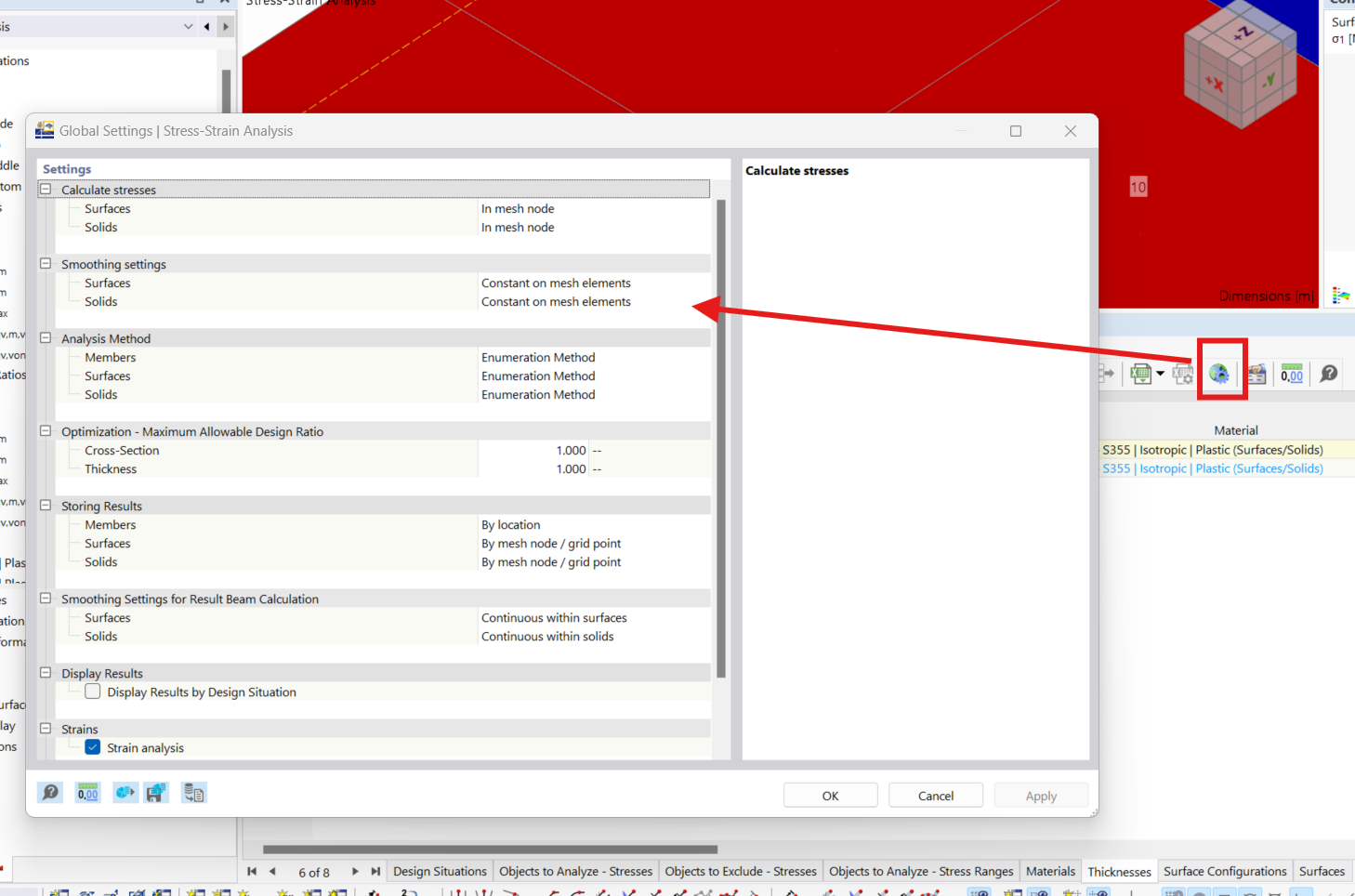
Here you can define in the global addon settings which result smoothing settings should be used for the addon, which I set to "constant in mesh elements" according to the nonlinear material:
dlubal_example.rf6 (1.0 MB)
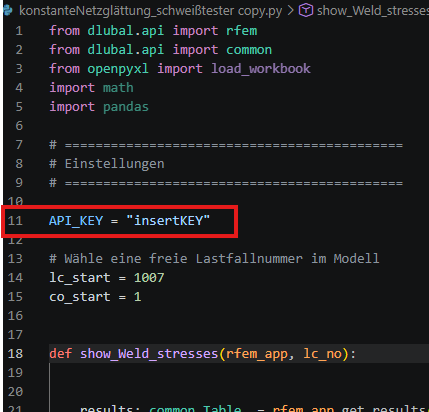
My initial hope was with the following API code:
from dlubal.api import RFEM
from dlubal.api import common
from openpyxl import load_workbook
import math
import pandas
============================================
Settings
============================================
API_KEY = "non of your business"
Select a free load case number in the model
lc_start = 1007
co_start = 1
def show_Weld_stresses(RFEM_app, lc_no):
results: common.Table  = rfem_app.get_results(

       results_type=rfem.results.ResultsType.STATIC_ANALYSIS_SURFACES_BASIC_STRESSES_MESH_NODES,

    ).data

results_lc = results[

    (results["loading"] == f"CO{lc_no}") #

    #(results["element_no"].isin([6885])) &

    #(results["tag"] == f"middle")

]

#cols = [

#    "loading",

#    "surface_no",

#    "mesh_node_no",

#    "element_no",

#    "sigma_x",

#    "sigma_y",

#    "tau_xy",

#    "tau_xz",

#    "tau_yz"

#]

#print("\nResults:\n", results_lc[cols].to_string())

results_analysis: common.Table = rfem_app.get_results(

       results_type=rfem.results.ResultsType.STRESS_STRAIN_ANALYSIS_SURFACES_STRAINS_BY_SURFACE,

).data

#results_lc_analysis = results_analysis[

#    (results_analysis["loading"] == f"CO{lc_no}") &

#    (results_analysis["element_no"].isin([6885]))

#]


#print("\nResults:\n", results_lc_analysis)

print("\nResults:\n", results_analysis)
def rechne_kombination(RFEM_app):
    rfem_app.calculate_all(

            skip_warnings=True

        )
def main():
lc_counter = co_start

with rfem.Application(api_key_value=API_KEY) as rfem_app:

    info = rfem_app.get_application_info()

    print(f'Version: {info.name}')


    rfem_app.get_active_model()     #loads the manual opened model into the here written script

    while lc_counter < 3:

         rechne_kombination(rfem_app=rfem_app)

         show_Weld_stresses(rfem_app=rfem_app,lc_no=lc_counter)

         lc_counter += 1
if name == "main":
main()
To obtain the strains according to the result smoothing "constant in mesh elements".
Because these were manually set in the opened model beforehand via GUI in the global addon settings.
If I now run the above code, I get the following results:
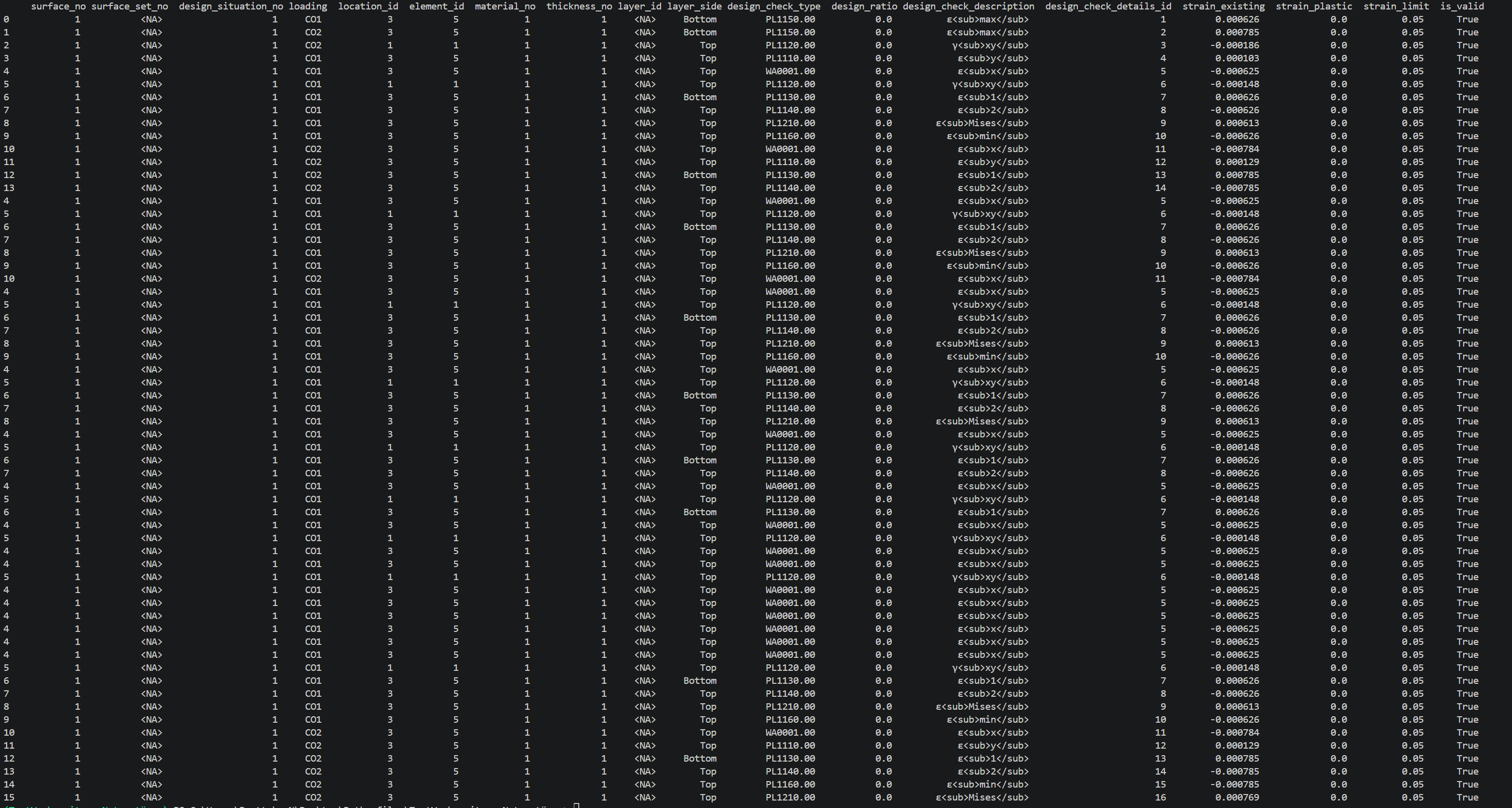
If I check whether these actually correspond to the constant smoothing, unfortunately it does not seem to be the case, if I am not mistaken, because let's look at the first row of the results:

For element 5 in load combination 1, at the bottom layer, I would need a comparison strain according to Mises of 0.000626 (0.626 per mille).
Unfortunately, it looks like that graphically for the constant mesh smoothing a result of 0.61 per mille occurs at element 5:
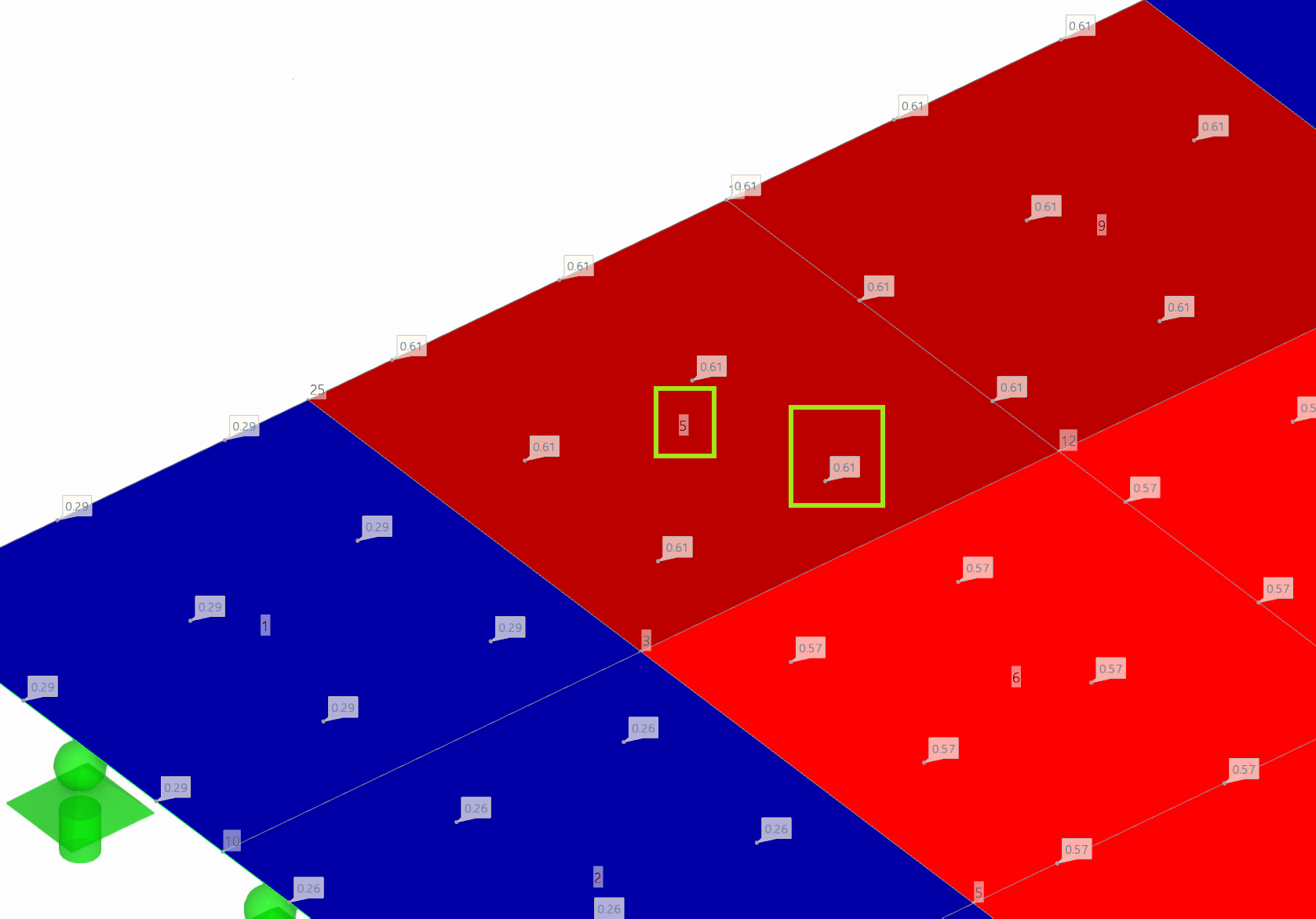
The tabular output of the static analysis results of the comparison strain according to Mises of load combination 1 also corresponds to these 0.61:
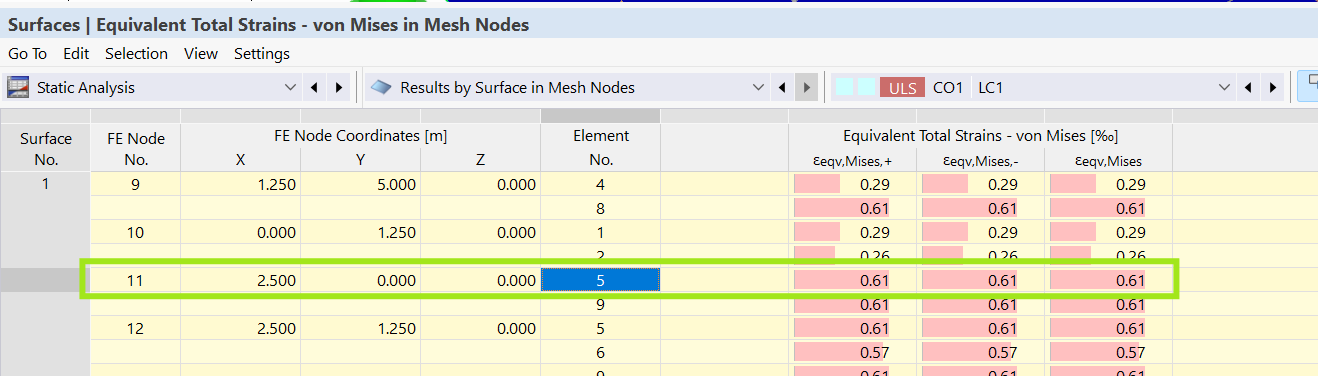
If, on the other hand, I set the result smoothing for static analysis to continuous in surface sets or in surfaces, I get a comparison strain of 0.63 per mille, which matches those of the Stress-Strain results addon => although it is explicitly set in the Global Settings to use the smoothing constant in mesh elements.
Here are the results of the static analysis for the calculation settings: continuous in surface sets or in surfaces:
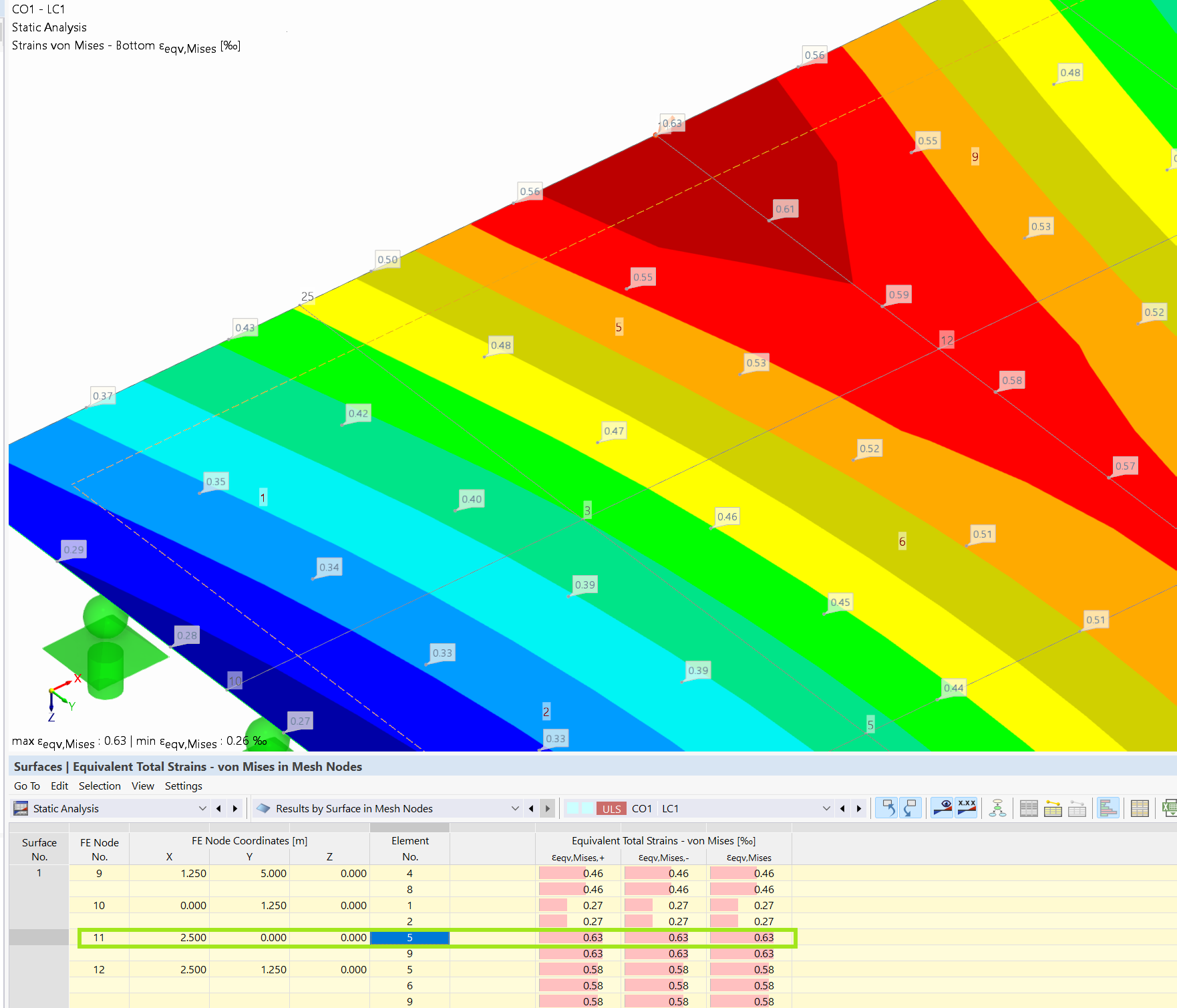
It therefore seems that the Stress-Strain Calculation addon itself, even with global settings to other result smoothing within the API, always outputs the results based on the setting continuous in surface sets or in surfaces.
Therefore the questions:
-
Am I correct with my statements/assumptions here? Or am I making a mistake?
-
Is it possible to explicitly define the global settings of the Stress-Strain Calculation addon within the API instead of first in the GUI? And if yes, how?