Hello everybody.
It’s nothing to be proud of but was already using RFEM6 for more then one year when I seriously spent some time on creating hotkeys and it’s definetly a Game Changer!!
I know there is still a lot of potential to optimize so I want to ask you :
What are your favorite / most used hotkeys ??
my top3 are:
hide selected objects : strg + h

only show selected objects: shift+h

show all objects : shift+r

2 Likes
Hi DeflectionPerfection,
Adjusting the rotation center around a selected object by pressing “Alt” and rotating with the mouse wheel is surprisingly an often unknown function.
Hotkeys I often use:
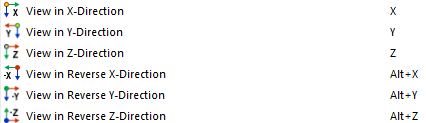
Adjust your View with X,Y,Z and reverse the view with “ALT”
Calculate current Loading: F5

Some other “Hotkeys” I like to use:
Select a member in Data-Navigator and press Shift + double click mouse wheel will zoom to the selected member.
Best regards
Paul Sivolgin
2 Likes
hi,
the view keys are definitely a big help, i also very like the strg+1/2/3 for switching between wireframe, solid and transparent display mode!
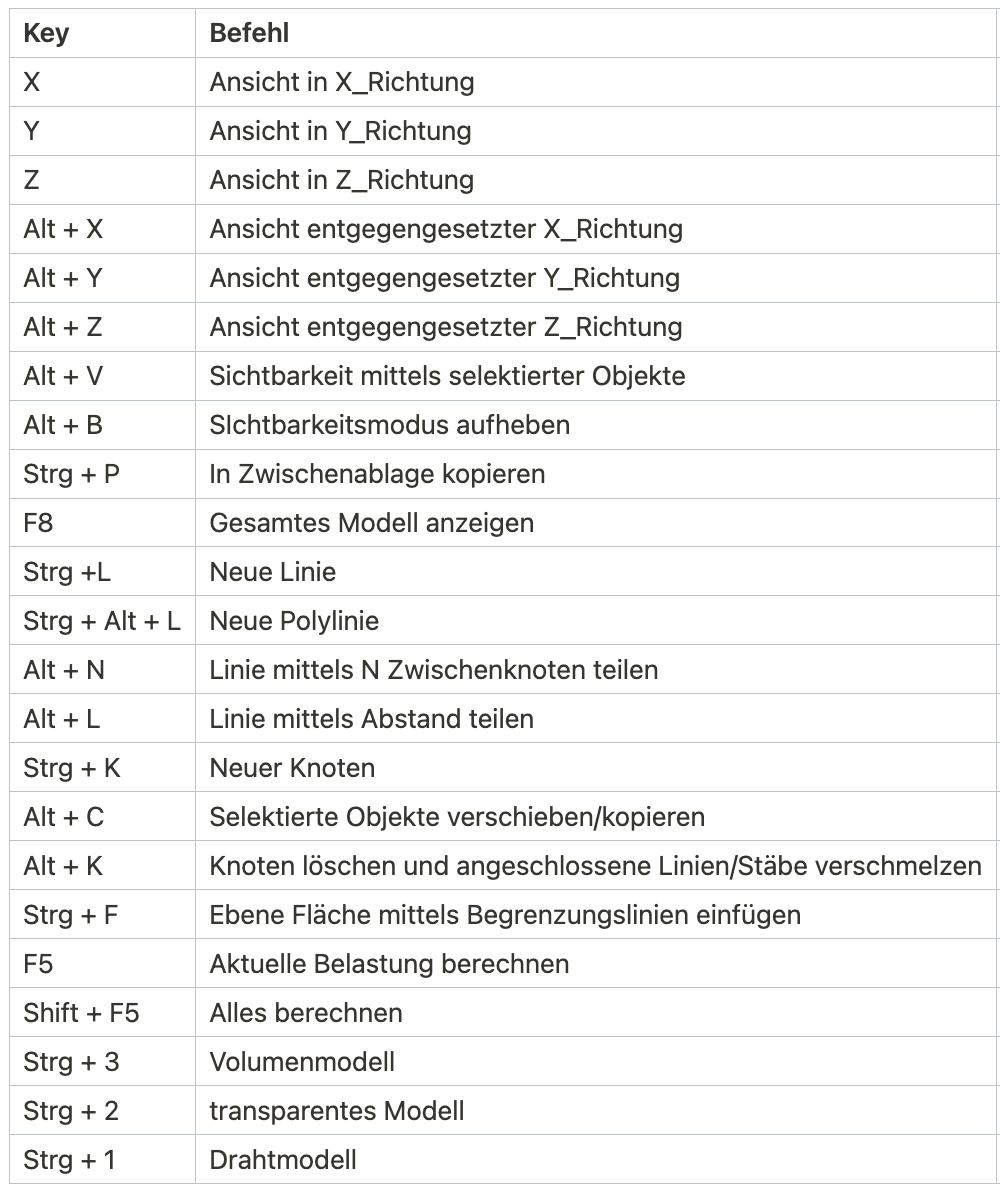
this are my most used keys and the (german) command (some were default, some defined by me):
4 Likes
Thanks for sharing your Favorite keys, stefan.vogl :) I prepared a translation of your table:
| Key |
Command |
| X |
View in X direction |
| Y |
View in Y direction |
| Z |
View in Z direction |
| Alt + X |
View in opposite X direction |
| Alt + Y |
View in opposite Y direction |
| Alt + Z |
View in opposite Z direction |
| Alt + V |
Toggle visibility of selected objects |
| Alt + B |
Cancel visibility mode |
| Strg + P |
Copy to clipboard |
| F8 |
Show entire model |
| Strg + L |
New line |
| Strg + Alt + L |
New polyline |
| Alt + N |
Divide line by N intermediate nodes |
| Alt + L |
Divide line by distance |
| Strg + K |
New node |
| Alt + C |
Move/copy selected objects |
| Alt + K |
Delete node and merge connected lines/members |
| Strg + F |
Insert plane surface using boundary lines |
| F5 |
Calculate current load |
| Shift + F5 |
Calculate all |
| Strg + 3 |
Solid model |
| Strg + 2 |
Transparent model |
| Strg + 1 |
Wireframe model |
Best regards,
Sören
4 Likes
Thanks for sharing your Hotkeylist,
The shift+doubleclick on mousewheel for zooming to the selected member of the data navigator doesn’t work for me.
Do i need the latest version of the software to use this function?
Regards,
Nick
Hi DeflectionPerfection,
This also worked in older versions. Perhaps I forgot to mention that you need to double-click on the workspace 
Best regards
Paul Sivolgin
1 Like
Having “move/copy selected objects” and the solidmodel/wireframe model on a short key brings modelling to another level! Thanks a lot for sharing !!
1 Like