Hello everyone.
I am currently trying to import an .xls file that contains point coordinates into RFEM 6 via the Terrain | Table tab that can be found on the Base Data .
What do I need to do to the file in order to import it?
Best regards,
Pedro
Hello everyone.
I am currently trying to import an .xls file that contains point coordinates into RFEM 6 via the Terrain | Table tab that can be found on the Base Data .
What do I need to do to the file in order to import it?
Best regards,
Pedro
Hi PedroSoares,
Thanks for your message! 
Unfortunately, I’ve just noticed that the import function can’t detect the active worksheet at the moment. We’ll take a closer look at this together with our development team and analyze what’s going on. 
As a workaround, you can still proceed without any issues:
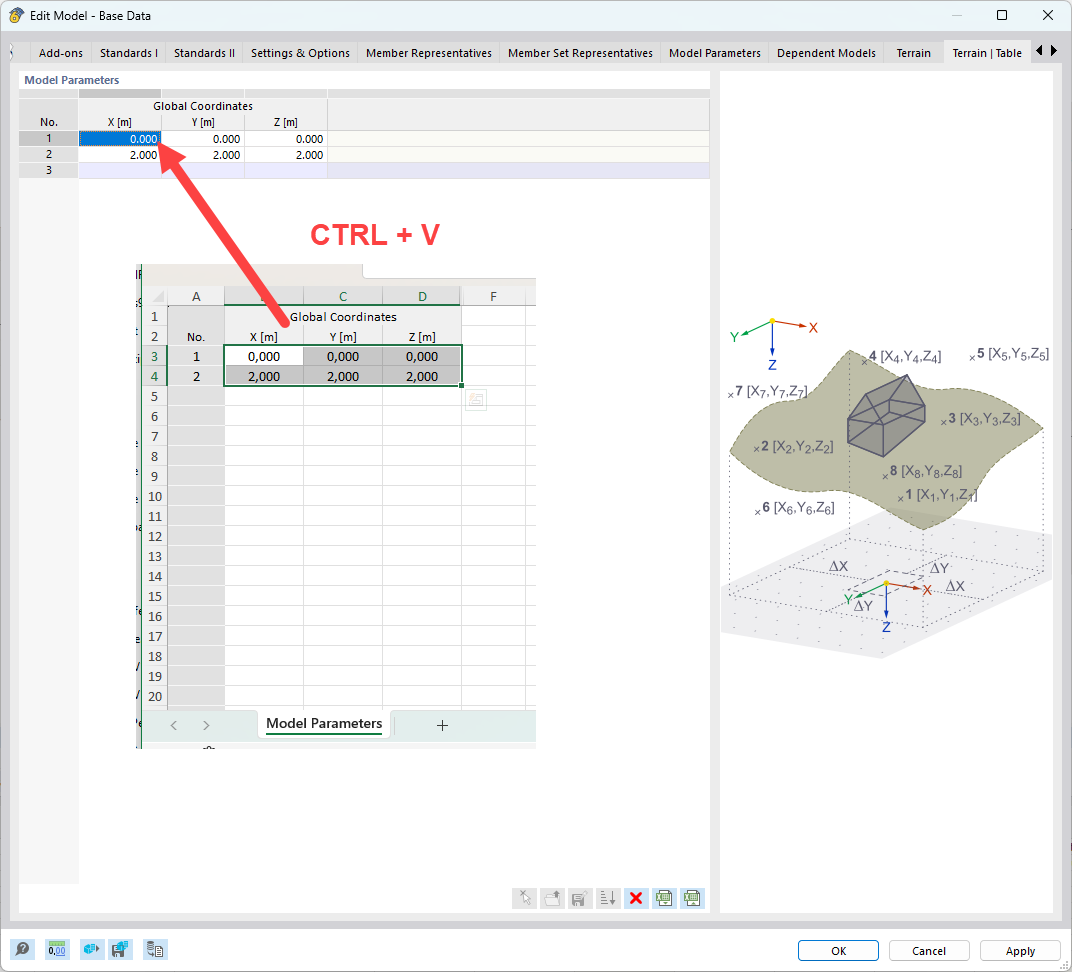
Copy your values directly from Excel
Paste them manually into the Terrain table using Ctrl + V
This should allow you to continue working smoothly in the meantime. 
Best regards
Stefan Hoffmann
Hello Stefan.
Thank you for the tip. I hope the function will be working soon.
Best regards,
Pedro