Dear Sir or Madam,
I would like to report a bug in RFEM 6.15.0009 that we have been able to reproduce consistently.
In load combinations, the load case factor is applied correctly to surface temperature loads and member temperature loads, but not to solid temperature loads (Solid Loads, Temperature type). In the combination, solids always receive the full temperature from the load case, regardless of the factor.
We have ruled out the following possible causes:
- Nonlinearities: Selecting “Ignore all nonlinearities” does not change the result.
- A combination with a factor of 1.0 produces exactly the same result as the load case.
- A newly created combination with identical factors produces the same incorrect result.
Impact
All combinations with temperature factors ≠ 1.0 produce incorrect internal forces in models with temperature loads on solids. Factors < 1.0 result in excessive restraint forces, while factors > 1.0 result in forces that are too low (on the unsafe side).
Question
Can you confirm this bug, and has it already been fixed in a newer version? As a workaround, we are currently using pre-scaled load cases, which are applied with a factor of 1.0 in the combinations.
Kind regards,
Dietmar Bobacz
Hi @Rail_Shark , welcome to the Dlubal Community 
Thank you for your message!
To analyze the problem in more detail, the model file would be very helpful:
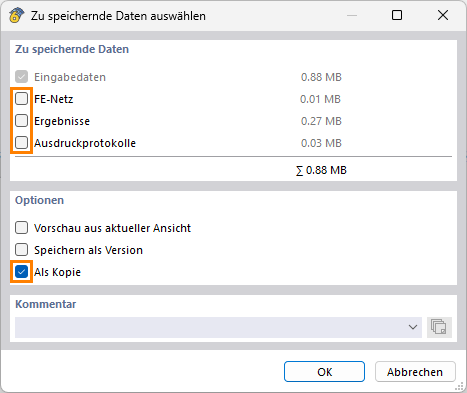
 Click File → Save As and select the following settings to reduce the file size:
Then upload the file here (e.g., *.rf6, *.rs9) – this will also allow the community to contribute to finding a solution.
 Don’t want to share the file publicly? No problem – send it to me via direct message: click on my profile picture or username → Message.
Best regards
Hedi Boukraa
RFEM_solid_temperature.rf6 (1.1 MB)
Hello Hedi!
I have put together an example for you. Here, you can see directly in the results that the loads on the solids are not scaled, even though this is shown graphically. It is best to look at the values of the result beam and compare load cases and load combinations.
I also noticed that although the XML export exports all settings as XML code, not all of them are transferred during import.
I noticed two of these errors—could you also test them using this RFEM file? Simply export the XML file and import it again.
- Element sizes are not transferred. When re-imported, they are shown as 0.5 m again.
- For result lines, the information assigning surfaces and solids, etc., is lost. As a result, the result line then displays nothing.
Best regards,
Dietmar
Hello @Rail_Shark,
Thank you very much for your detailed bug report.
I can confirm the error: Load cases scaled manually satisfy superposition exactly; likewise, a combination with a factor of 1.0 produces exactly the result of the load case. However, every combination with a factor other than 1.0 deviates. The deviation depends on the location: at a pure plate node away from the upstand, the ratio is 0.99, while at a node of the solid element it is 0.75.
If I delete the solid-element thermal load and leave the surface thermal load unchanged, all combinations are correct again. Thus, the combination factor is applied to the surface thermal load, but not to the thermal load on the solid element.
The error also occurs in the latest version and has therefore not been fixed in any currently available version. I have forwarded it to our development team.
Your approach of using prescaled load cases with a factor of 1.0 in the combinations is mathematically sound and the correct temporary workaround.
I was able to reproduce your second point regarding the XML import and have forwarded it to our development team.
If you have any questions, please feel free to contact me.
Best regards