When generating a mesh for a rather complex geometry, it repeatedly breaks off and shows Error 55, referring to a solid that itself shows no error message. Adjustments to the FE length have also been unsuccessful so far. According to the website, Error 55 is a network license update issue... I am using the student version, maybe that makes a difference?
Hi Bau_Ja,
Thank you for your message!
To analyze the problem more precisely, the model file would be very helpful:
 Click on File → Save As and choose the following settings to reduce the file size:
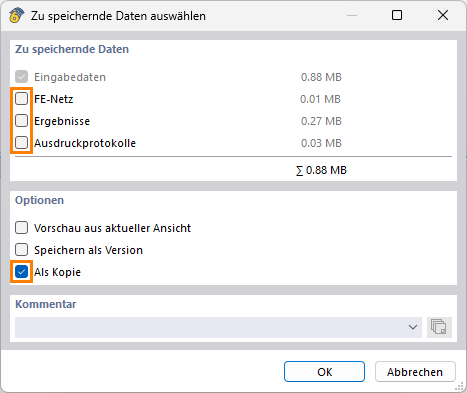
Then upload the file here (e.g. *.rf6, *.rs9) – this way the community can also help find a solution.
 Don’t want to share the file publicly? No problem – send it to me via direct message: click on my profile picture or my username → Message.
Best regards
Marco Nikoleizig
Assembly_fifth_complete_w_simple_screws_export.rf6 (2.8 MB)
For explanation: I had to divide the middle component into several small solids in order to be able to create solids from the surfaces that do not generate error messages. Also as info, I originally designed the construction in Inventor and then imported it into RFEM as a STEP file.
(P.S. I did not find the private messaging function)
Hi Bau_Ja,
Before modeling solid bodies, it is recommended to use the model checking functions available in RFEM 6. These allow, for example, detecting crossing, unconnected, or overlapping lines. Such errors often occur after importing geometry.
https://www.dlubal.com/de/downloads-und-infos/dokumente/online-handbuecher/rfem-6/000437
For complex geometries, it is advisable to create the solid bodies in sections. This makes mesh errors easier to detect since the number of boundary surfaces remains manageable.
Based on the supplied model, I created such a partial volume. For this, I inserted additional boundary surfaces. Afterwards, the volume could be meshed successfully.
The following image shows the procedure using an example:
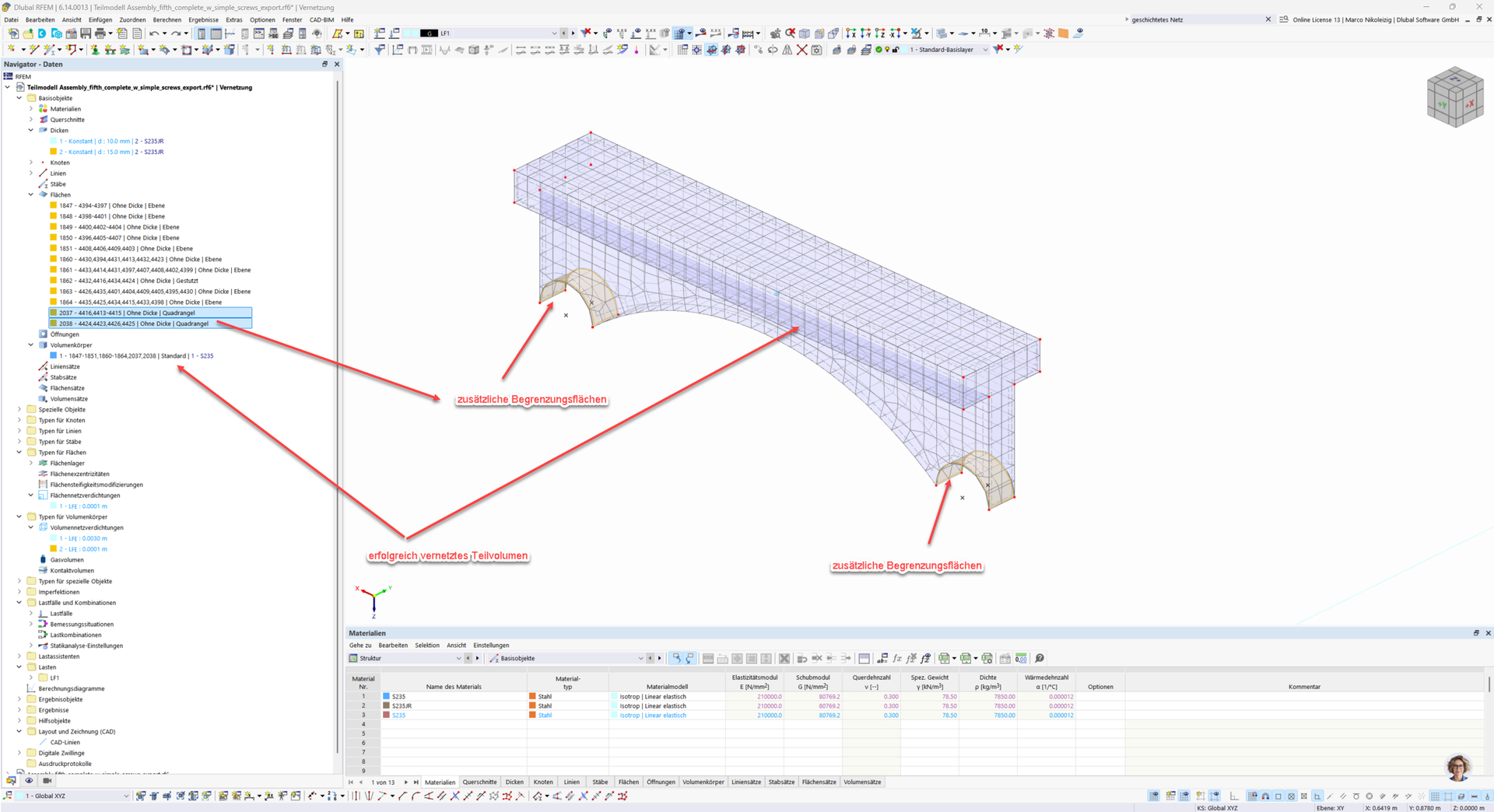
Continue in this way until all solid bodies are correctly recognized and meshed.
Best regards
Marco Nikoleizig
1 Like
Thank you for the quick response.
Does that mean you can already network the partial models individually and then put them back together? Or does "section-wise" only refer to the creation of the solid bodies? Because I have already done that, maybe just not in enough detail yet.
Best regards
Hi Bau_Ja,
Ich würde so vorgehen: Alle Volumen im Ursprungsmodell löschen, den verbliebenen Flächen vom Steifigkeitstyp “Ohne Dicke” den Typ “Standard” mit dem Material Stahl zuweisen und prüfen, ob diese Flächen vernetzt werden können. Eventuell muss die Geometrie hier schon nachgebessert werden, je nach erscheinender Fehlermeldung.
Wenn die Vernetzung der Flächen gelungen ist, kann man mit der Modellierung der Volumen beginnen. Da hierbei offenbar Probleme auftreten, würde ich nun die Flächen, an denen ich die Volumen modellieren möchte, markieren und mit der Tastenkombination ‘Strg+C’ kopieren. Diese Flächen füge ich in ein neues RFEM 6 - Modell mit ‘Strg+V’ ein. An diesen Flächen wird nun der Volumenkörper definiert, wie in obiger Antwort gezeigt.
Gelingt die Vernetzung des Volumenkörpers, fährt man so fort, andernfalls muss man auf die Fehlermeldungen reagieren.
Viele Grüße
Marco Nikoleizig