I have been having a hard time with creating nodal support rows for EC3 using the following versions:
API2 v2.12.10 with RFEM6.12.0010
API2 v2.12.12 with RFEM6.12.0012
API2 v2.12.13 with RFEM6.12.0013
In the code below I set-up everything, and the member set is created correctly except for the nodal support rows.
=========================================================
public List<IMessage> Get_iMessages(bool useDefaultNumber)
{
    List<IMessage> list = new List<IMessage>();

    int selNro = this.Building.List_nros_steelEffectiveLengths.Count + 1;
    this.Building.List_nros_steelEffectiveLengths.Add(selNro);

    ec3EffectiveLength.NodalSupportsTable ns_table = new ec3EffectiveLength.NodalSupportsTable();

    foreach (ec3EffectiveLength.NodalSupportsRow row in Get_List_ec3EffectiveLength_NodalSupportsRow())
    {
        ns_table.Rows.Add(row);
    }


    list.Add(new RfemApi2.SteelDesign.SteelEffectiveLengths()
    {
        MemberSets = { this.Number },
        FlexuralBucklingAboutY = true,
        FlexuralBucklingAboutZ = true,
        TorsionalBuckling = true,
        LateralTorsionalBuckling = true,
        IntermediateNodes = true,
        DifferentProperties = true,
        Comment = "testing",
        NodalSupports = ns_table,
    });

    list.Add(new RfemApi2.StructureCore.MemberSet()
    {
        No = this.Number,
        Name = this.ToString(),
        Members = { Get_listOfNros_members() },
        SetType = RfemApi2.StructureCore.MemberSet.Types.SetType.Continuous,
        DesignPropertiesActivated = true,
        SteelEffectiveLengths = selNro,
    });


    return list;
}
=========================================================
In the code above, the list of IMessage json items that the method Get_List_ec3EffectiveLength_NodalSupportsRow() returns is as below:
=========================================================
{ "no": 1, "supportType": "SUPPORT_TYPE_INDIVIDUALLY", "supportInZ": true, "eccentricityType": "ECCENTRICITY_TYPE_NONE", "supportInY": "SUPPORT_IN_Y_SUPPORT_STATUS_YES", "restraintAboutX": "RESTRAINT_ABOUT_X_SUPPORT_STATUS_YES", "restraintAboutZ": "RESTRAINT_ABOUT_Z_SUPPORT_STATUS_NO", "restraintWarping": "RESTRAINT_WARPING_SUPPORT_STATUS_NO", "nodes": [ 1 ] }

{ "no": 2, "supportType": "SUPPORT_TYPE_FIXED_ALL", "supportInZ": true, "eccentricityType": "ECCENTRICITY_TYPE_NONE", "supportInY": "SUPPORT_IN_Y_SUPPORT_STATUS_YES", "restraintAboutX": "RESTRAINT_ABOUT_X_SUPPORT_STATUS_YES", "restraintAboutZ": "RESTRAINT_ABOUT_Z_SUPPORT_STATUS_YES", "restraintWarping": "RESTRAINT_WARPING_SUPPORT_STATUS_YES", "nodes": [ 2 ] }

{ "no": 3, "supportType": "SUPPORT_TYPE_NONE", "supportInZ": false, "eccentricityType": "ECCENTRICITY_TYPE_NONE", "supportInY": "SUPPORT_IN_Y_SUPPORT_STATUS_NO", "restraintAboutX": "RESTRAINT_ABOUT_X_SUPPORT_STATUS_NO", "restraintAboutZ": "RESTRAINT_ABOUT_Z_SUPPORT_STATUS_NO", "restraintWarping": "RESTRAINT_WARPING_SUPPORT_STATUS_NO", "nodes": [ 3 ] }
=========================================================
also, the final list of IMessage json items sent to RFEM6 for the creation of the memberset looks like below:
=========================================================
{ "comment": "testing", "memberSets": [ 1 ], "flexuralBucklingAboutY": true, "flexuralBucklingAboutZ": true, "torsionalBuckling": true, "lateralTorsionalBuckling": true, "nodalSupports": { "rows": [ { "no": 1, "supportType": "SUPPORT_TYPE_INDIVIDUALLY", "supportInZ": true, "eccentricityType": "ECCENTRICITY_TYPE_NONE", "supportInY": "SUPPORT_IN_Y_SUPPORT_STATUS_YES", "restraintAboutX": "RESTRAINT_ABOUT_X_SUPPORT_STATUS_YES", "restraintAboutZ": "RESTRAINT_ABOUT_Z_SUPPORT_STATUS_NO", "restraintWarping": "RESTRAINT_WARPING_SUPPORT_STATUS_NO", "nodes": [ 1 ] }, { "no": 2, "supportType": "SUPPORT_TYPE_FIXED_ALL", "supportInZ": true, "eccentricityType": "ECCENTRICITY_TYPE_NONE", "supportInY": "SUPPORT_IN_Y_SUPPORT_STATUS_YES", "restraintAboutX": "RESTRAINT_ABOUT_X_SUPPORT_STATUS_YES", "restraintAboutZ": "RESTRAINT_ABOUT_Z_SUPPORT_STATUS_YES", "restraintWarping": "RESTRAINT_WARPING_SUPPORT_STATUS_YES", "nodes": [ 2 ] }, { "no": 3, "supportType": "SUPPORT_TYPE_NONE", "supportInZ": false, "eccentricityType": "ECCENTRIC...

{ "no": 1, "name": "IPE 300 | Continuous members: 1,2", "setType": "SET_TYPE_CONTINUOUS", "members": [ 1, 2 ], "designPropertiesActivated": true, "steelEffectiveLengths": 1 }
=========================================================
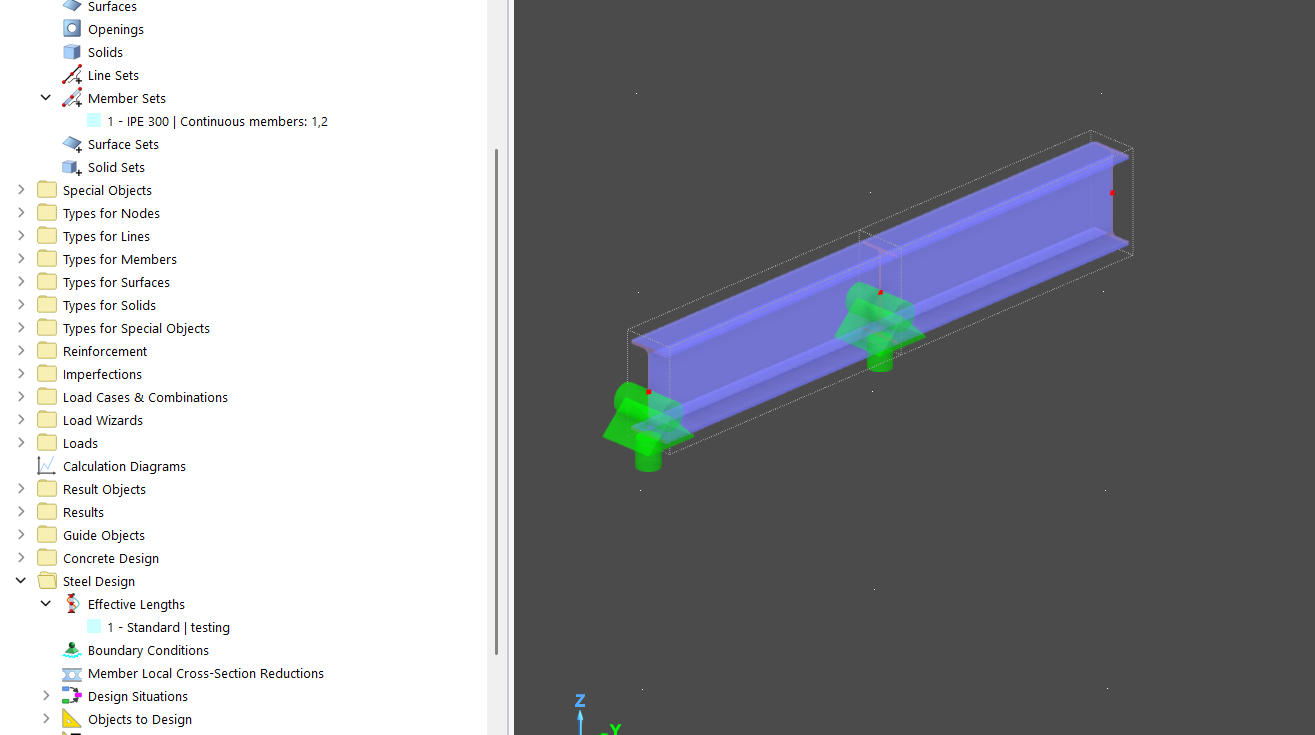
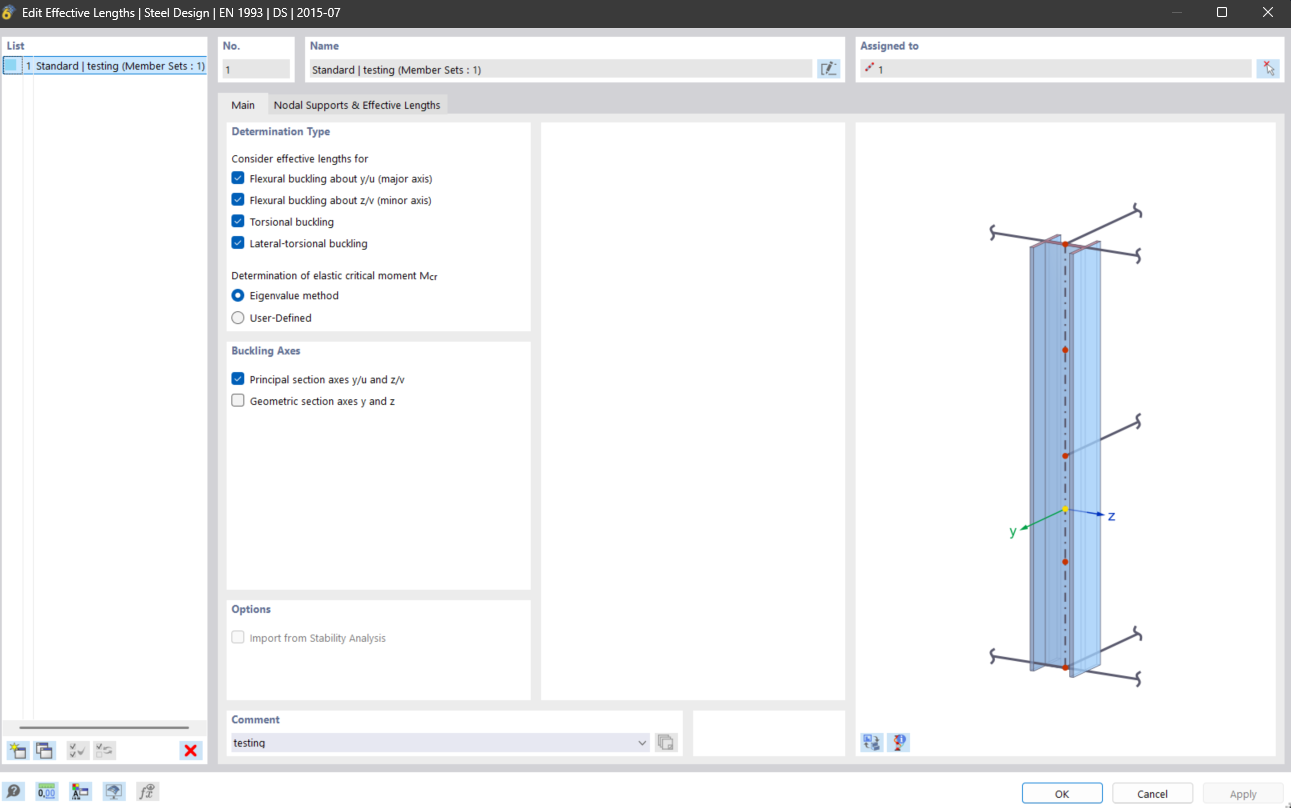
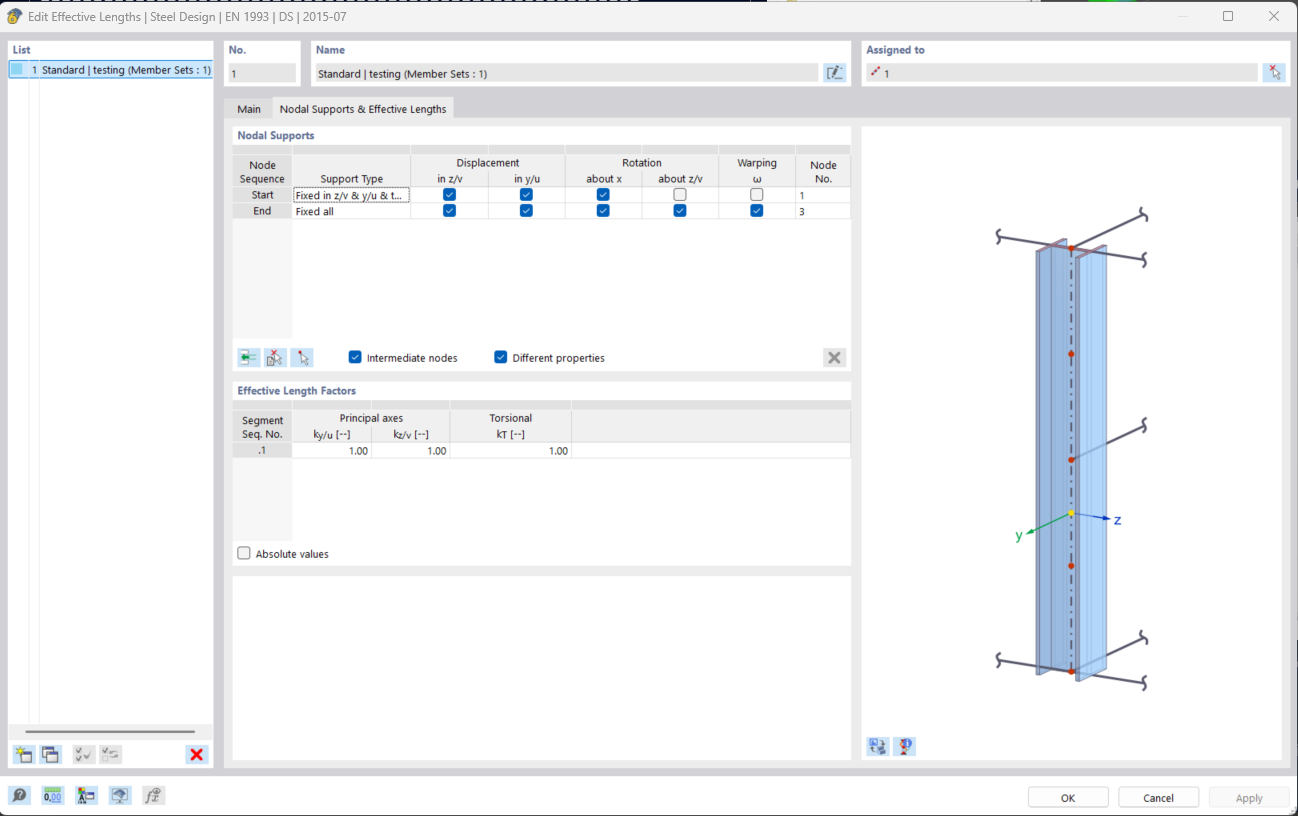
As seen in the images below, the memberset is correct, and all the settings (except for the buckling lengths which I didn't assign) are correct but the nodal support table rows are wrong. Based on the json messages sent to RFEM6, there should have been 3 nodal support rows, but there are only 2 of them, which also don't have the designated DOF requested by the code.
The boolean 'IntermediateNodes = true, only checks the checkbox 'Intermediate node' but the list of rows does not insert them in the table. When I manually click the 'insert button' it addes the rows, for which I haven'y found an equivalent in the code.
I didn't find any examples for this in the list of examples in the documentations page. Also the standard documentation pages (here, here) do not provide examples or hints.
Also, when get the same object back from RFEM6 using API2, below, it shows that it disregarded the information I sent to it.
| Property Name |
Value |
| BucklingFactorValueType |
Theoretical |
| CbFactorAisc |
0 |
| CbFactorCsa |
0 |
| CbFactorNbr |
0 |
| Comment |
testing |
| DeterminationCbAisc |
BasicValue |
| DeterminationCbCsa |
BasicValue |
| DeterminationCbNbr |
BasicValue |
| DeterminationMcrAisc |
Eigenvalue |
| DeterminationMcrBs5 |
Eigenvalue |
| DeterminationMcrCsa |
Eigenvalue |
| DeterminationMcrEurope |
Eigenvalue |
| DeterminationMcrGb50 |
EigenvalueMethod |
| DeterminationMcrIs800 |
Eigenvalue |
| DeterminationMcrNbr8800 |
Eigenvalue |
| DeterminationMcrSans |
Eigenvalue |
| DeterminationMcrSia263 |
Eigenvalue |
| DeterminationOfElasticCriticalStressAisi |
FiniteStripMethod |
| DeterminationOmega2Sans |
BasicValue |
| DifferentProperties |
TRUE |
| Factors |
{ rows: [ { flexuralBucklingU: 1, flexuralBucklingV: 1, torsionalBuckling: 1 } ] } |
| FactorsDefinitionAbsolute |
FALSE |
| FlexuralBucklingAboutY |
TRUE |
| FlexuralBucklingAboutZ |
TRUE |
| GeneratingObjectInfo |
|
| GeometricSectionAxes |
FALSE |
| HasBucklingFactorValueType |
FALSE |
| HasCbFactorAisc |
FALSE |
| HasCbFactorCsa |
FALSE |
| HasCbFactorNbr |
FALSE |
| HasComment |
TRUE |
| HasDeterminationCbAisc |
FALSE |
| HasDeterminationCbCsa |
FALSE |
| HasDeterminationCbNbr |
FALSE |
| HasDeterminationMcrAisc |
FALSE |
| HasDeterminationMcrBs5 |
FALSE |
| HasDeterminationMcrCsa |
FALSE |
| HasDeterminationMcrEurope |
TRUE |
| HasDeterminationMcrGb50 |
FALSE |
| HasDeterminationMcrIs800 |
FALSE |
| HasDeterminationMcrNbr8800 |
FALSE |
| HasDeterminationMcrSans |
FALSE |
| HasDeterminationMcrSia263 |
FALSE |
| HasDeterminationOfElasticCriticalStressAisi |
FALSE |
| HasDeterminationOmega2Sans |
FALSE |
| HasDifferentProperties |
TRUE |
| HasFactorsDefinitionAbsolute |
TRUE |
| HasFlexuralBucklingAboutY |
TRUE |
| HasFlexuralBucklingAboutZ |
TRUE |
| HasGeneratingObjectInfo |
FALSE |
| HasGeometricSectionAxes |
TRUE |
| HasIdForExportImport |
TRUE |
| HasImportFromStabilityAnalysisEnabled |
TRUE |
| HasIntermediateNodes |
TRUE |
| HasIsGenerated |
TRUE |
| HasLateralTorsionalBuckling |
TRUE |
| HasMemberType |
FALSE |
| HasMemberTypeYy |
FALSE |
| HasMemberTypeZz |
FALSE |
| HasMetadataForExportImport |
TRUE |
| HasModificationFactorAlphaRestrainedSegmentsAs |
FALSE |
| HasModificationFactorAlphaUnrestrainedSegmentsAs |
FALSE |
| HasModificationFactorCbAisi |
FALSE |
| HasModificationFactorCbAisiUserDefinedValue |
FALSE |
| HasMomentModificationRestrainedSegmentsAs |
FALSE |
| HasMomentModificationUnrestrainedSegmentsAs |
FALSE |
| HasName |
TRUE |
| HasNo |
TRUE |
| HasOmega2FactorSans |
FALSE |
| HasPrincipalSectionAxes |
TRUE |
| HasSlendernessReductionRestrainedSegmentsAs |
FALSE |
| HasSlendernessReductionUnrestrainedSegmentsAs |
FALSE |
| HasStabilityImportDataFactorsDefinitionAbsolute |
FALSE |
| HasStabilityImportDataMemberY |
FALSE |
| HasStabilityImportDataMemberZ |
FALSE |
| HasStabilityImportDataModeNumberY |
FALSE |
| HasStabilityImportDataModeNumberZ |
FALSE |
| HasStabilityImportDataUserDefinedY |
FALSE |
| HasStabilityImportDataUserDefinedZ |
FALSE |
| HasStandardOfEffectiveLengths |
FALSE |
| HasTorsionalBuckling |
TRUE |
| HasUserDefinedNameEnabled |
TRUE |
| IdForExportImport |
0af6b4ed-cdb1-42b8-8aeb-a1fd7f783024 |
| ImportFromStabilityAnalysisEnabled |
FALSE |
| IntermediateNodes |
TRUE |
| IsGenerated |
FALSE |
| LateralTorsionalBuckling |
TRUE |
| Lengths |
null |
| Members |
[Collection: 0 items] |
| MemberSets |
[Collection: 1 items] |
| MemberType |
Beam |
| MemberTypeYy |
Beam |
| MemberTypeZz |
Beam |
| MetadataForExportImport |
|
| ModificationFactorAlphaRestrainedSegmentsAs |
0 |
| ModificationFactorAlphaUnrestrainedSegmentsAs |
0 |
| ModificationFactorCbAisi |
BasicValue |
| ModificationFactorCbAisiUserDefinedValue |
0 |
| MomentModificationRestrainedSegmentsAs |
BasicValue |
| MomentModificationUnrestrainedSegmentsAs |
BasicValue |
| Name |
Standard |
| No |
1 |
| NodalSupports |
{ rows: [ { supportType: SUPPORT_TYPE_FIXED_IN_Z_Y_AND_TORSION, supportInZ: true, eccentricityType: ECCENTRICITY_TYPE_NONE, supportInY: SUPPORT_IN_Y_SUPPORT_STATUS_YES, restraintAboutX: RESTRAINT_ABOUT_X_SUPPORT_STATUS_YES, restraintAboutZ: RESTRAINT_ABOUT_Z_SUPPORT_STATUS_NO, restraintWarping: RESTRAINT_WARPING_SUPPORT_STATUS_NO }, { supportType: SUPPORT_TYPE_FIXED_ALL, supportInZ: true, eccentricityType: ECCENTRICITY_TYPE_NONE, supportInY: SUPPORT_IN_Y_SUPPORT_STATUS_YES, restraintAboutX: RESTRAINT_ABOUT_X_SUPPORT_STATUS_YES, restraintAboutZ: RESTRAINT_ABOUT_Z_SUPPORT_STATUS_YES, restraintWarping: RESTRAINT_WARPING_SUPPORT_STATUS_YES } ] } |
| Omega2FactorSans |
0 |
| PrincipalSectionAxes |
TRUE |
| SlendernessReductionRestrainedSegmentsAs |
AccTo5611 |
| SlendernessReductionUnrestrainedSegmentsAs |
AccTo5611 |
| StabilityImportDataFactors |
null |
| StabilityImportDataFactorsDefinitionAbsolute |
FALSE |
| StabilityImportDataLengths |
null |
| StabilityImportDataLoadingY |
null |
| StabilityImportDataLoadingZ |
null |
| StabilityImportDataMemberY |
0 |
| StabilityImportDataMemberZ |
0 |
| StabilityImportDataModeNumberY |
0 |
| StabilityImportDataModeNumberZ |
0 |
| StabilityImportDataUserDefinedY |
FALSE |
| StabilityImportDataUserDefinedZ |
FALSE |
| StandardOfEffectiveLengths |
Aisc360 |
| TorsionalBuckling |
TRUE |
| UserDefinedNameEnabled |
FALSE |
I'm setting up the code by following the hints given in the documentation class definitions and the objects read from RFEM, but it does not work. @frank.faulstich, @robert.milrath, @tomas.pail, do you know why this is happening?