Hello everyone,
I am creating parameterized timber hall systems using the RFEM 6 API. For this, I want to implement new different distribution types for beams (Uniform, Linear, Gable, etc.).
Now to my problem with the implementation.
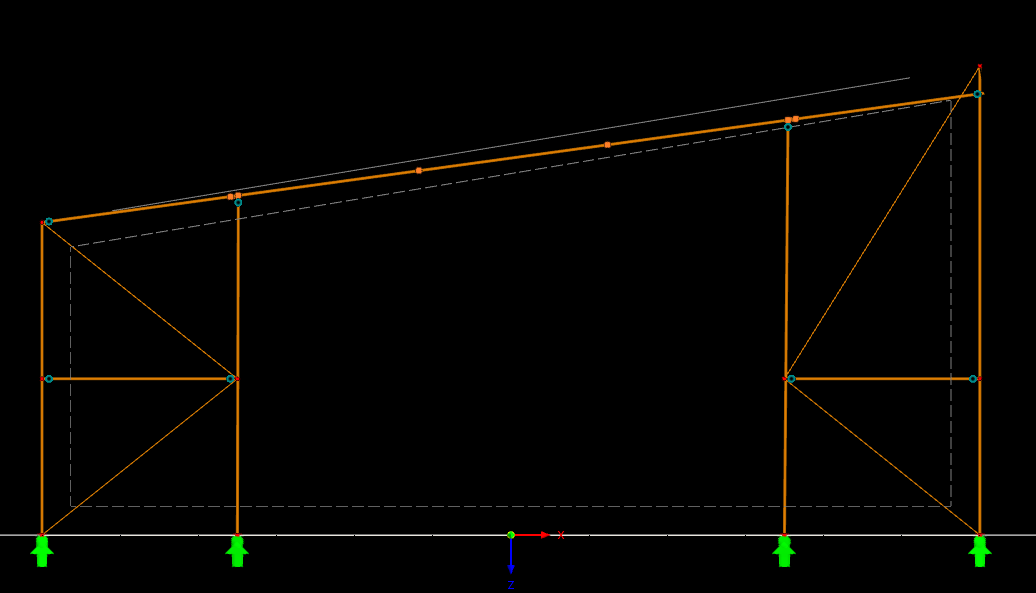
I create my frame according to the code (Attachment 1). Accordingly, I assign my members to a previously defined line – i.e., my nodes for the support heads and the nodes of the main beam are identical. However, as soon as I no longer distribute the cross-section uniformly but change it to, for example, "Linear," the system line is recalculated at the end due to the changed cross-section. As a result, the system line of the beam no longer reaches the head node of the support (see image – top right).
My cross-sections are created as follows depending on the selection option (Attachment 2).
How do I appropriately proceed here to specify when defining the beam that its centroidal axis is always defined on the assigned line, regardless of the cross-section distribution type, or are there perhaps other approaches to solve the problem described?
Thank you very much in advance!
ATTACHMENT 1:
// =====================================================================================
// NODES (Horizontal beam at height "Frame_MinHeight")
// =====================================================================================
FullFrame.Add(new RFEM.StructureCore.Node { No = 1, Coordinate1 = parameter_Structure.Frame_Width * 0.5 }); // Bottom Right
FullFrame.Add(new RFEM.StructureCore.Node { No = 2, Coordinate1 = parameter_Structure.Frame_Width * 0.5, Coordinate3 = -parameter_Structure.Frame_MinHeight }); // Top Right (Eaves)
FullFrame.Add(new RFEM.StructureCore.Node { No = 3, Coordinate1 = -parameter_Structure.Frame_Width * 0.5, Coordinate3 = -parameter_Structure.Frame_MinHeight }); // Top Left (Eaves)
FullFrame.Add(new RFEM.StructureCore.Node { No = 4, Coordinate1 = -parameter_Structure.Frame_Width * 0.5 }); // Bottom Left
// =====================================================================================
// LINES
// =====================================================================================
FullFrame.Add(new RFEM.StructureCore.Line { No = 1, DefinitionNodes = { 1, 2 } }); // Right Support
FullFrame.Add(new RFEM.StructureCore.Line { No = 2, DefinitionNodes = { 3, 2 } }); // Main Beam (Horizontal from left to right)
FullFrame.Add(new RFEM.StructureCore.Line { No = 3, DefinitionNodes = { 4, 3 } }); // Left Support
// =====================================================================================
// DEFINE MEMBERS
// =====================================================================================
var supportRight = new RFEM.StructureCore.Member
{
No = 1,
Line = 1,
CrossSectionStart = CrossSectionManager.Id_SupportY,
Type = RFEM.StructureCore.Member.Types.Type.Beam,
Comment = "Support Right",
TimberServiceClass = GetNklId(parameter_CrossSection.NKL_SupportFrame)
};
var supportLeft = new RFEM.StructureCore.Member
{
No = 3,
Line = 3,
CrossSectionStart = CrossSectionManager.Id_SupportY,
Type = RFEM.StructureCore.Member.Types.Type.Beam,
Comment = "Support Left",
TimberServiceClass = GetNklId(parameter_CrossSection.NKL_SupportFrame),
};
var beam = new RFEM.StructureCore.Member
{
No = 2,
Line = 2,
Type = RFEM.StructureCore.Member.Types.Type.Beam,
Comment = "Main Beam (Horizontal system axis)",
TimberServiceClass = GetNklId(parameter_CrossSection.NKL_MainBeam),
};
ATTACHMENT 2
// ==========================================
// 3. MAIN BEAM (Dynamic depending on type) -> Material 2
// ==========================================
Id_MainBeamStart = currentNo++;
// Determine start height (eaves height for special forms such as gable/shed roof beams)
double hStart = 0;
if (pc.MainBeam_DistributionType == "Uniform") hStart = pc.MainBeam_Height;
else if (pc.MainBeam_DistributionType == "Linear (Voute)") hStart = pc.MainBeam_HeightStart;
else hStart = pc.MainBeam_HeightEaves; // Gable and shed roof beams
crossSections.Add(new RFEM.StructureCore.CrossSection
{
No = Id_MainBeamStart,
Material = 2,
Name = System.FormattableString.Invariant($"R_M1 {pc.MainBeam_Width / 1000.0}/{hStart / 1000.0}")
});
// If not uniform, create the END cross-section (or first cross-section)
if (pc.MainBeam_DistributionType != "Uniform")
{
Id_MainBeamEnd = currentNo++;
  double hEnd = 0;
  if (pc.MainBeam_DistributionType == "Linear (Voute)") hEnd = pc.MainBeam_HeightEnd;
  else hEnd = pc.MainBeam_HeightFirst; // Gable and shed roof beams

  crossSections.Add(new Rfem.StructureCore.CrossSection
  {
      No = Id_MainBeamEnd,
      Material = 2, // Same material as start
      Name = System.FormattableString.Invariant($"R_M1 {pc.MainBeam_Width / 1000.0}/{hEnd / 1000.0}")
  });
}
else
{
// Fallback for uniform: end ID is the same as start ID
Id_MainBeamEnd = Id_MainBeamStart;
}