Required reinforcement for servicability checks

Hi,

I watched the Masterclass on Concrete Design, but I don’t think this topic was covered.

Is there an option in RFEM 6 to automatically determine the additional reinforcement required for the serviceability limit state (SLS) like in RFEM 5?

What I would like to do is define only the basic reinforcement for the entire slab, and then have RFEM automatically use the difference between the basic reinforcement and the calculated required reinforcement as additional reinforcement for the SLS, similar to the approach shown in the attached image.

In other words, I would like to avoid manually defining additional reinforcement zones throughout the slab.

Is this possible in RFEM 6, and if so, where can this option be found?

Thanks!

Hello @dbesed,

Yes, this is possible in RFEM 6. You don't need to define the additional reinforcement zones manually.

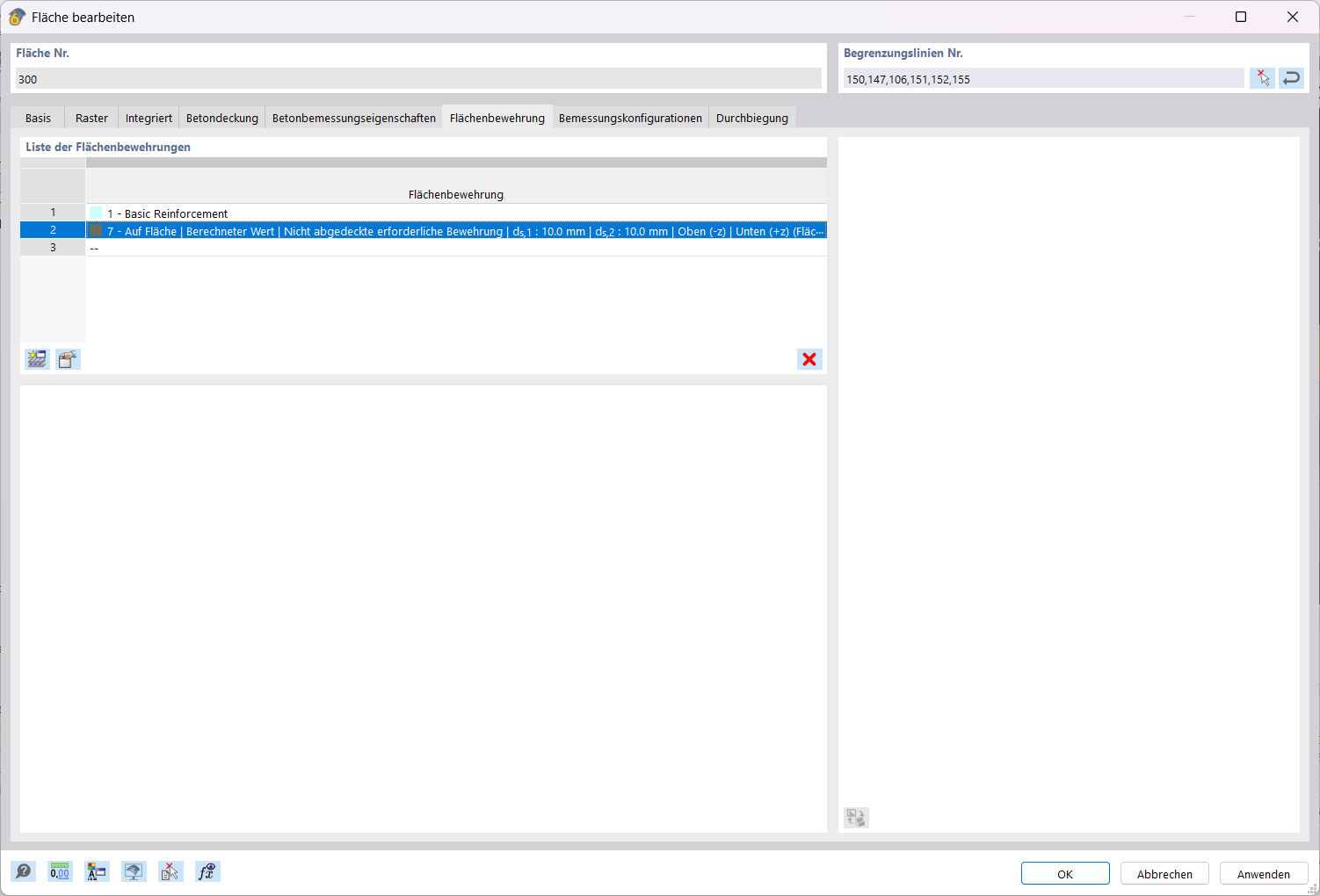
To do this, use a second surface reinforcement in the surface and set the reinforcement type to "Calculated value | Uncovered required reinforcement".

This reinforcement type provides the program-generated design of the surface reinforcement ratio. The ultimate limit state checks are carried out for this purpose. The required reinforcement determined from these checks is adopted as the existing reinforcement for the "Calculated value" type of surface reinforcement. This reinforcement is then designed further, including for the serviceability limit state.

Procedure for the surface ("Surface Reinforcement" tab):

  1. First, define the basic reinforcement for the entire slab.
  2. Then create a second surface reinforcement and select the type "Calculated value | Uncovered required reinforcement", with the desired bar diameters and layers.

This automatically adds only the difference between the basic reinforcement and the calculated required reinforcement. In the attached image, you can see both entries in the list of surface reinforcements.

You can find more information in the manual:

Best regards,
Hedi

Hello,

Thank you—that is good to know.

Am I correct in assuming that the SLS checks are performed using the provided reinforcement?

Can this calculated additional reinforcement also be used for nonlinear deformation calculations, or do I need to define it manually for these calculations?

Could you please check the attached file? I obtain the following deflections:

  • Concrete Design add-on: approximately 5.9 mm.
  • Nonlinear calculation with manually defined reinforcement: approximately 7.5 mm.
  • RFEM 5: Add on approximately 12 mm.
  • RFEM 5: Add on + NL approximately 7,5 mm.

Could you help me understand why these results differ? Have I made an error when defining the parameters for the Concrete Design add-on (missing Kriechen+ Schwinden )?

test.rf6 (3.9 MB)

Kind regards,
Dani

Hello @dbesed,

About the SLS checks:
Yes, your assumption is correct. With the reinforcement type "Calculated value | Required reinforcement not covered", the ultimate limit state is checked first. The reinforcement resulting from it is taken over as provided reinforcement, and the SLS checks (crack width, stresses, deflection) are then carried out with exactly this reinforcement.

About the nonlinear calculation:
Unfortunately this does not apply here. The nonlinear deformation analysis runs in the RFEM model itself (nonlinear material model + structure modification for reinforced concrete), not in the Concrete Design add-on. You still have to define the reinforcement manually for it – the reinforcement calculated by the add-on is not transferred automatically.

About the deflection comparison:
Different values from the add-on and from the nonlinear analysis are to be expected, because the approaches are different:

  • The addon works analytically with equivalent stiffnesses over the entire cross-section (linear elastic material). The damage is covered by a global distribution coefficient ζ – deliberately on the safe side.
  • The nonlinear analysis uses an FE model with a nonlinear concrete material. The damage is determined individually for each element of the cross-section, and tension stiffening acts locally. This is closer to reality.

As a rule, the nonlinear analysis therefore gives a smaller deflection than the add-on (about 15 % lower in our comparison example). In your case it is the other way round (add-on 5.9 mm versus NL 7.5 mm), which suggests that something is indeed still missing.

Please check the following points:

  1. Creep: creep is activated in the linear concrete material. Is it also activated in your model with the non-linear material model? In the nonlinear model: creep via the analysis type "Static analysis | Creep and shrinkage (linear)", the reinforcement stiffness via the structure modification, and the short-term damage via the "Consider initial state" function.

  2. Same load combination: Are you comparing the same design situation in both calculations (quasi-permanent or characteristic)?

  3. Governing cracked state: In the serviceability configuration you can set the cracked state to be taken from the associated load combination. This changes the result noticeably.

  4. Same reinforcement: Make sure that both model have the same reinforcement in both surfaces.

Both approaches are described and compared in detail in these articles:

Best regards
Hedi

Hi, thanks for the detailed reply. I’ll read the two articles you provided.

I made sure that all the settings matched. I also checked the model in RFEM 5, and the nonlinear calculation results agree with those from RFEM 6.

What puzzles me is that the Concrete Design add-on gives a lower deflection. As you mentioned, I would have expected a higher value than in the nonlinear calculation.

Could you please check the provided model to see whether there are any obvious errors in the Concrete Design add-on settings (I’m new to RFEM 6 and still learning how to use it.)?

Kind Regards Dani

Please send me also the model calculated with RF-Concrete so I can compare it to the RFEM6 Addon model.

Sorry, I don’t have access to it at the moment. Could you just check if the settings in RFEM 6 are correct?

Hello @dbesed

I checked your model, and the settings are correct:

Creep and shrinkage are activated. The addon uses a creep coefficient of φ = 2.626 and a shrinkage strain of εcs = −0.470‰

Serviceability configuration: The deflection check is activated for the quasi-permanent design situation only, and tension stiffening is activated.

• Reinforcement: You defined an additional reinforcement of the type "not covered reinforcement". It adds 1.34 cm²/m to the bottom reinforcement in the 1st direction, which results in a total of 3.85 cm²/m.

Please have a look at the distribution coefficient ζ (EN 1992-1-1, 7.4.3, Eq. 7.18). It describes how much the cross-section is cracked:

  • ζ = 0: uncracked (state I)
  • ζ = 1: fully cracked (state II)

In your model, ζ = 0 in the field, which means the slab is not cracked there. The full stiffness of the uncracked concrete section is therefore used, and this explains the small deflection.

I suggest comparing the creep and shrinkage coefficients aswell as the reinforcement in RFEM5 model and make sure they are the same as in RFEM6.

Kind regards
Hedi

Ok. Thnks for the detailed answer.