Hi Dlubal,
I am having a bit of difficulty retrieving/viewing results in the native program functions, and to be frank the export function handles things in a way that makes it hard to interpret or check models.
I will focus on the topic of support reactions, but the difficulty is not limited to this topic and encompasses several model items and result views mostly inside the Statical Analysis module.
(Focus point: Static Analysis → Results by node → Support Forces)
My main difficulties can best be described as:
- I cannot view several combination results in the same table
- I cannot view several design situations in the same table
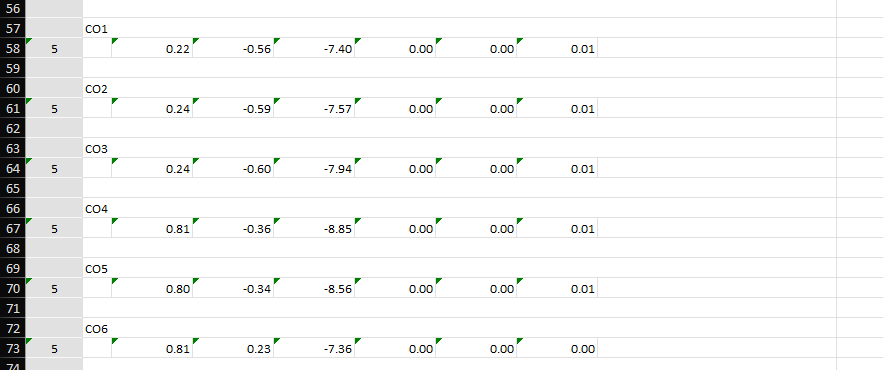
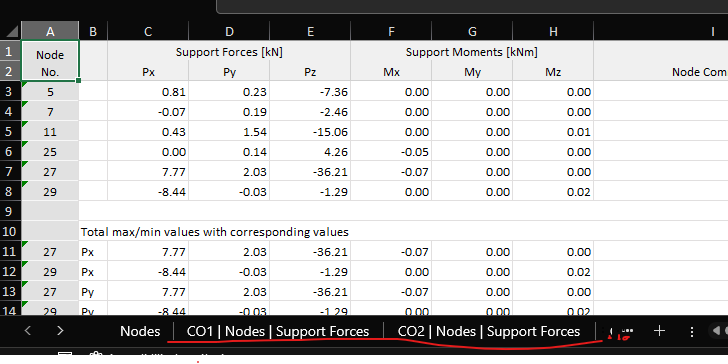
- When exporting, the data format is either as shown below where each combination is a “header” for each node, or the export will be a large multiple of excel tabs for each combination
- I have to export the data to perform the desired reaction checks
- The post-processing due to export formatting can be extensive. And when thinking it through, possibly bespoke for each model.
I hope there is a program native function or setting I am missing that enables this, I am not interested in an API based solution :)
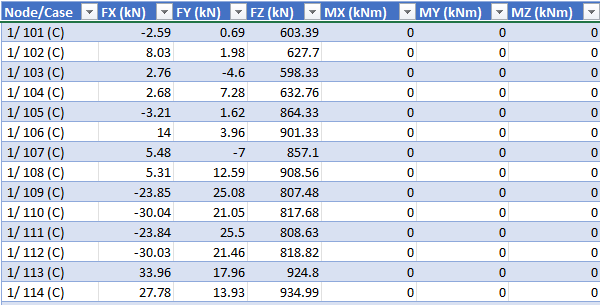
A more or less easy fix could be to remove the “CO..” as a ‘heading’ in the export code. Or enable that the data is stored in sequential rows. These are much more manageable with the native Excel sorting and filtering functions.
Example of exported reaction overview with “Results ordered by objects, then by loading”
Example of exported reaction overview without “Results ordered by objects, then by loading”
Example of desired data format (or close to) - sequential rows of nodal data points.
Best Regards,
Mark

 so it can be considered for a future update.
