Such a filter is currently not available. Thanks for the suggestion.
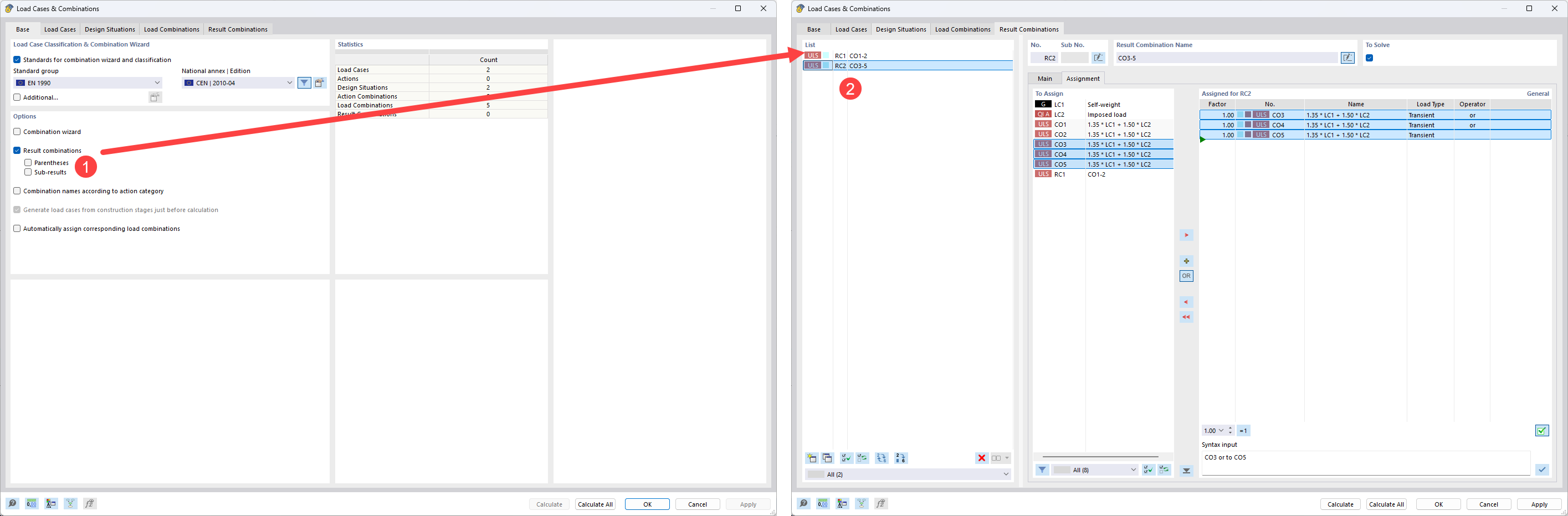
However, in this case, you do not need to create two Design Situations. Similar to RFEM 5, you can activate Result Combinations and define two separate Result Combinations while filtering the CO assignment beforehand.
Do you think it would still be beneficial to add an additional filter for combinations beyond this existing functionality?
Using Result Combinations will directly allow to differ in design later on and “keep” your information of filtering. This would not be possible by adding a filter for result inspection only.
Thank you for that solution - It seems it would work for us, we will look into it.
Are there any pitfalls we should be specifically aware of regarding non-linear analysis while using Result Combinations for this specific ‘filter’ use?
To answer your question - this definitely seems like a better workflow than enabling a ‘quick filter’ function. But UX wise it could seem complex for users to discover this workflow. Maybe it should be brought closer to the UI
thanks for your feedback. As the normal customer tends to only use Design Situations instead of RC, I guess for most people, this is common setting for UX to not have too much options. You can use templates to start up with this settings being activated, if you want to:
If you superpose nonlinear load cases in a RC, this is wrong in terms of results.
If you only evaluate OR envelopes of CO in a RC, this should be a valid way, even for nonlinear systems, as you do not superpose results. You only envelope CO results.