RFEM 6 file size and performance vs RFEM 5

Hello,

I have concerns about file size and performance in RFEM 6. Similar issues existed in RFEM 5, but on a smaller scale.

For a real project (a building 50 × 50 m, 3 storeys), the RFEM 6 model size is around 8 GB. Opening the file takes a long time, saving is slow, and RAM usage is roughly equal to the file size. There are about 500 load cases and load combinations, each around 15 MB, which leads to the large total size.

I compared RFEM 5 and RFEM 6 on an identical sample model. RFEM 6 files are about 2.5 times larger than RFEM 5. It seems RFEM 6 stores more results. The main issue appears to be that all load combinations are treated as independent loadings, so calculations and results are stored separately—even for linear analysis. If I use Result Combinations (RC) instead of Load Combinations (LO), the file size barely increases.

Here are some figures from a sample model (notations: LC = Load Case, LO = Load Combination, RC = Result Combination):

  • 8 LC → 60 MB (RFEM 6) vs 23 MB (RFEM 5)
  • 8 LC + 100 RC → 66 MB (RFEM 6) vs 25 MB (RFEM 5)
  • 8 LC + 100 LO → 896 MB (RFEM 6) vs 327 MB (RFEM 5)

Questions:

  1. For linear analysis, should I always use RC instead of LO to reduce calculation time and file size?
  2. Is it possible to disable storing some results I don’t need (e.g., certain stress components or strains in shells)?

Any advice or best practices would be appreciated.

Thank you!

FILESIZE_TEST-FS.rf5 (1.0 MB)
FILESIZE_TEST-FS.rf6 (1.3 MB)
Hi Pavel,

Thank you for your interesting question.

First of all, RFEM 6 is not a further development of RFEM 5 but a completely new application. This also means that the file format has changed. When you open an RFEM 5 file in RFEM 6, an import function interprets the content of the RFEM 5 file and creates an RFEM 6 file from it.

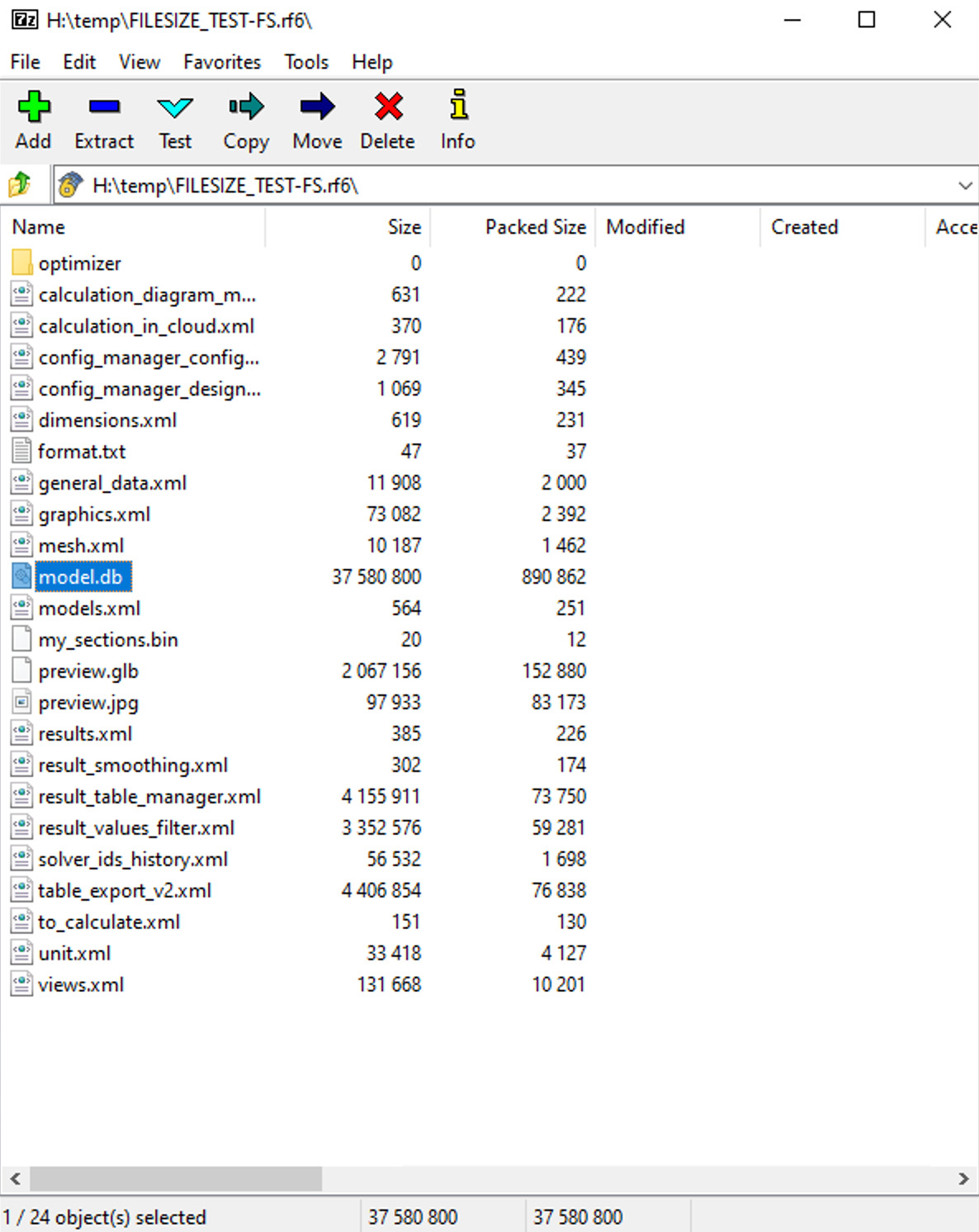
What has remained the same is the handling of RFEM files. An RFEM file is a zip archive. You can view it with 7zip, for example.

When you open the file, the archive is unzipped into the working folder. When you work on the model or perform calculations, the results are saved in the working folder. Only when you save the file is the working folder packed into a zip archive with the extension rf6.

File size

The difference between RFEM 5 and RFEM 6 is how the data is saved in the working folder. In RFEM 5, these were mainly binary files. In RFEM 6, we use an SQLite database for this purpose. The SQLite database may require more space than binary files, but access is faster and more secure.

RFEM 6 now calculates significantly more results than RFEM 5, which is why the file size tends to be larger.

It is not possible to deselect certain results and not save them in the file. Implementing such a feature would be more difficult than it seems at first glance, and the benefits are limited.

If you want to speed up opening and saving files, I recommend the measures described in this FAQ:

https://www.dlubal.com/en/support-and-learning/support/faq/002239

If the real-time monitoring of the antivirus software checks every single file when unpacking the zip archive, this takes a lot of time.

Difference between load combination and result combination

Your observation is correct. A load combination is nothing more than a normal load case in which the loads from different load cases are added together.

In a result combination, the load cases contained are calculated. The results are combined in real time, i.e., only when displayed in the graphic. These results are not saved. This saves space, especially since result combinations would take up considerably more space than load combinations if they were saved.

For smaller and medium-sized models that are linear, result combinations make more sense. The calculation time is shorter and the file size is smaller.

If there are significant delays in the display, you should switch to load combinations.

Be careful with nested result combinations. These can significantly impact performance.

Frank

2 Likes

I’m not fully convinced that access itself became faster. Since the RFEM 6 model files are roughly 2.5 times larger than in RFEM 5, reading and writing them naturally takes longer. Even if SQLite provides improvements in internal access speed, Windows file I/O becomes the dominant bottleneck simply due to the increased volume of data. Larger files inevitably mean longer loading and saving times.
Regarding “more secure,” I’m not entirely sure what is meant here. If we are talking about data integrity or crash-resistance, RFEM 5 never caused any serious issues on my side that would justify this significant increase in file size.

Unfortunately, this is not really an option for many users. In a corporate environment, antivirus settings are managed centrally, and I cannot disable or adjust file scanning. This makes the suggestion impractical in many cases.

I usually do not use nested result combinations, even though the feature is useful. For linear analysis I use Result Combinations as a direct replacement for Load Combinations, and the Combination Wizard allows choosing between generation of LO or RC.
However, there is one frustrating limitation: Result Combinations, even when using the “Superposition” type, never display loads in the graphic view. I hope it can be improved in the future, and load visualization is added.

Opening and saving files naturally takes longer with larger files. I completely agree with you on that. However, these operations are relatively rare.

For example, when you set a node or draw a line, these new objects are written to the database in the working folder. These very frequent operations are much faster in RFEM 6 than in RFEM 5. With very large models in RFEM 5, significant delays occurred after such operations.

By “more secure,” I mean data integrity. SQLite is a real SQL database with everything that goes with it.

1 Like

Yes, I realize that a company administrator is not necessarily happy when an RFEM user wants to add exceptions for the antivirus software.

The version that will be released next week (RFEM 6.12.0010) will include a change in the calculation kernel that will at least reduce the performance issues with the antivirus software during calculations.

1 Like

Result combinations can be complex. For this reason, load display has not yet been implemented for this.

However, it should be possible for simple result combinations at least. I will add your suggestion to our wish list.

1 Like

I totally agree there should not be load visualization for nested RC or those with "or" combining. But specifically "Superposition" type should always be the same as "traditional" load combinations.

1 Like

also concrete add-on takes a long time to run for 103 members and about 350 load combinations. The "remaining time" has been stuck at 0:00:01 for hours now.

Hello PSA001,

Could you please send me the file in question?

Best regards,
Frank

Hi Frank,

Thank you for your message.

I'm not allowed to share the model, unfortunately.

It would be useful if RFEM6 could export some metadata/performance information from the model (excluding project information) to help find problems.

Without a model, it is difficult for me to find the cause. When designing concrete structures, this setting often helps to speed up the design process:

Frank

Thank you Frank for the suggestion.

However, it didn't improve the situation, as the remaining time has been stuck for the past 45 minutes equal to "0:00:01".

envelope method ran under 2 hours, but now the problem is that deflections are not calculated because of the envelope method. Without these results, I would have to go back to the enumeration method and run it over night :confused:

We would like to get to the bottom of this and improve RFEM. Unfortunately, this is not possible without the file...

Frank

1 Like