Hello Community,
Currently, I have a strange error that occurs only with an RFEM instance installed on a VM.
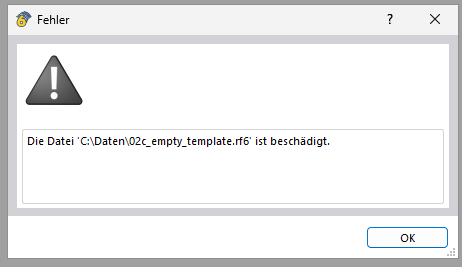
When trying to open a model, an error message appears saying that the file is corrupted. However, the same file can be opened without any problems on my local PC.
Since the error only occurs on the VM, I suspect it is not an RFEM-specific problem but related to the environment. Therefore, a question to the Dlubal team:
Do you have any hints on where I can start troubleshooting? Could the opening of models possibly be influenced by virus scanners, etc.?
Thanks for the support!
Expected behavior:
- RFEM opens the file without errors
Actual behavior:
- An error message appears (see screenshot)
System Info
OS: Windows Server 2025 Datacenter
RAM: 8GB
CPU: AMD EPYC 74F3
Hypervisor: VMware
RFEM version: 6.12.0009
Hi hasslernils,
If the behavior only occurs in the virtual environment, the cause is often insufficient memory allocation or missing user permissions. 
When working, a folder can quickly be created in the working directory that requires several gigabytes (.rf6 is an archive that unpacks the file into the working directory during editing). Please check the current memory or disk allocation of your VM. Depending on what you are working on, there should be 10-50 GB free here.
You can find more details in our FAQ article:
 https://www.dlubal.com/de/support-und-schulungen/support/faq/005379
If you still notice problems after the adjustment, please let us know — we are always here to support you! 
Best regards
Stefan Hoffmann
Hi Stefan,
Thank you very much for the quick response.
The error actually occurred after I changed the working directory.
Strangely, there is more memory available in the new working directory than before.
I have now reinstalled RFEM fresh and apparently fixed the error.
Thank you very much!
1 Like
Hello Stefan,
I have an update regarding the error.
After the reinstallation, it worked for a while, but this morning I had to notice the same error again.
Additionally, a new phenomenon occurs: RFEM no longer starts. The loading screen disappears quietly and silently again without displaying any further errors.
I then searched through the RFEM logs and came across an SQLITE 3 error "unable to open database file." RFEM apparently cannot open the database in AppData\\Local\\Temp.
Is there a possibility to send you or the developers the logs?
In the meantime, I am trying as a workaround to reset the working path to the default value.
Best regards
Nils Haßler
Hi hasslernils,
Thank you for your feedback.
In general, this sounds like a local problem; we can gladly take a look at the logs.
Send them to me via direct message: click on my profile picture or my username → message.
Best regards
Stefan Hoffmann