Hi,
I've been using this page of the API documentation: SurfaceReinforcement — Dlubal API documentation
I have a surface and have successfully made the top and bottom rebar. I have set the diameter to auto, and the spacing to fixed at 0.2m. I was also able to set the min and max diameter, and was able to check the list of possible diameters, but wasn't able to set the list of Diameters for reinforcement.
This is my code:
    usable_diameters = [12, 16, 20, 24, 28, 32, 36]
    # Convert diameters from millimetres to metres – RFEM API expects metres
    mm_to_m = 1.0 / 1000.0
    min_diameter_m = min(usable_diameters) * mm_to_m
    max_diameter_m = max(usable_diameters) * mm_to_m
    # Keep the usable diameter list in millimetres (integers) as required by the API
    usable_diameters_mm = [int(d) for d in usable_diameters]  # Convert to integers

    logger.info(f"Final usable_diameters_mm being passed to RFEM API: {usable_diameters_mm}")
    logger.info(f"Min diameter (m): {min_diameter_m}, Max diameter (m): {max_diameter_m}")

    # Surface reinforcement including additional transverse reinforcement (90°)
    logger.info("Creating main surface reinforcement with parameters:")
    logger.info(f"  rebar_diameter_auto_diameters_enabled: False (using custom list)")
    logger.info(f"  rebar_diameter_auto_diameters: {usable_diameters_mm}")
    logger.info(f"  rebar_diameter_auto_minimum: {min_diameter_m}")
    logger.info(f"  rebar_diameter_auto_maximum: {max_diameter_m}")

    surface_reinf = rfem.types_for_concrete_design.SurfaceReinforcement(
        no=1,
        surfaces=[surfaces["footing_surface"]],
        material=rebar_mat_no,

        # Main reinforcement – fixed spacing, auto diameter within limits
        rebar_spacing=LONG_REBAR_SPACING,
        rebar_spacing_auto_enabled=False,
        rebar_diameter_auto_enabled=True,
        rebar_diameter_auto_minimum=min_diameter_m,
        rebar_diameter_auto_maximum=max_diameter_m,
        rebar_diameter_auto_diameters_enabled=True,
        rebar_diameter_auto_diameters=usable_diameters_mm,

        # Additional transverse reinforcement (90° direction)
        additional_transverse_reinforcement_enabled=True,
        additional_rebar_spacing=LONG_REBAR_SPACING,
        additional_rebar_spacing_auto_enabled=False,
        additional_rebar_diameter_auto_enabled=True,
        additional_rebar_diameter_auto_minimum=min_diameter_m,
        additional_rebar_diameter_auto_maximum=max_diameter_m,
        additional_rebar_diameter_auto_diameters_enabled=True,
        additional_rebar_diameter_auto_diameters=usable_diameters_mm,

        # Use custom coordinate system if provided
        projection_coordinate_system=coord_system_no if coord_system_no is not None else 0,

        user_defined_name_enabled=True,
        name="Footing Main Reinf",
    )
    objects.append(surface_reinf)
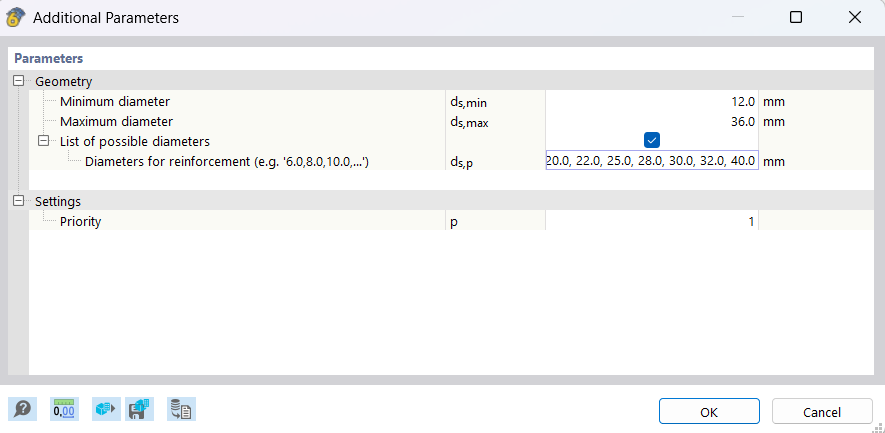
As you can see the diameters for reinforcement isn't matching my list in the code.
Any ideas of what I am doing wrong? I know for the min and max diameter I have to put the values in meters, but then in the api docs for rebar_diameter_auto_diameters it expects integers so I figured it had to be millimetres.
Thanks!
Samuel
 I was able to reproduce the issue and will forward it to our development team. Once a solution is available, we will be sure to keep you updated.
 .
.