I was curious if it is possible to enable the "calculate critical load" function that is present under the options in RFEM 6.12 loadcombinations from my grasshopper script, currently im toggling it manually but Iwant to run an optimisation where i find the stable configurations of a model.
I tried to use a template but for optimisation you override the template, otherwise it cannot function as a loop it seems.
Has anyone tried something like this before?
Hey Kaj,
currently the components don’t support the activation of the structure stability add-on settings in the load combinations.
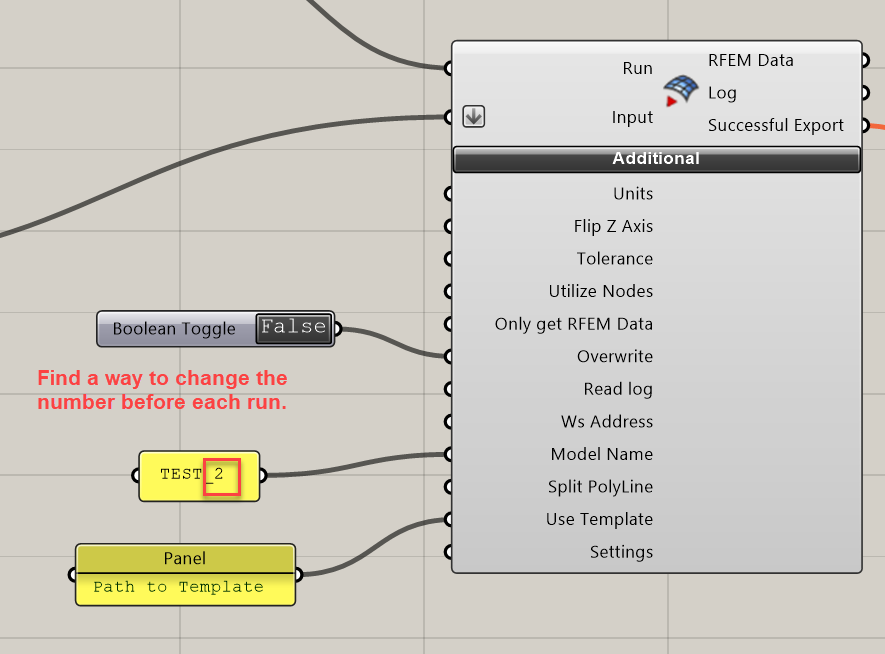
The only way you can use the feature is the template - as you wrote. The template can however only be used when you create a “new” file during the export from GH to RFEM.
That is related to the logic of RFEM itself.
If you create a new file → you can activate a template
If you have already a file open → you can’t activate a template or read information from templates into your active file. The GH Link can’t work around the limits of RFEM here.
Additionally “Overwriting” as an option inside the GH script has to be turned off. If you have it set to “True”, the export component will:
→ Create a new file → Load information from Template → Overwrite all information → Write data from GH Script into RFEM
So all the info from your template are gone. Therefor “Overwrite” has to be set to “False”.
So how could you run the export multiple times?
- You could change the name of the model file before each run. If that can be secured, each export creates a new RFEM file.
- We have a component that can close an active RFEM file:
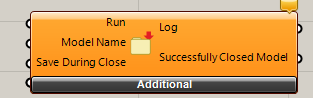
Maybe you find a way to implement it into your workflow, that it will be executed before another export-attempt.