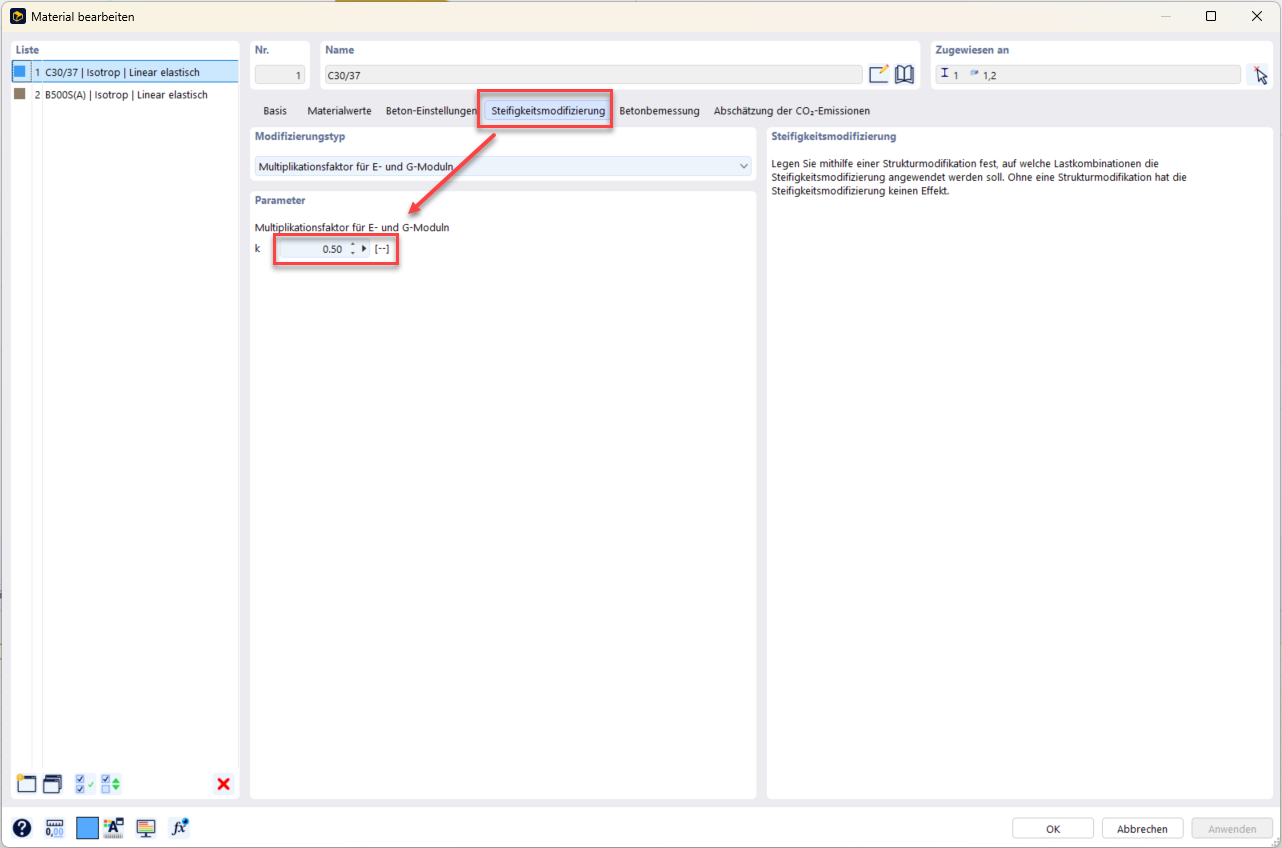
As part of my master's thesis, I am using the student version of Dlubal RFEM 6. I have noticed that the stiffness modification does not appear to work as expected.
When I multiply the stiffness by a factor of 0.5 using the stiffness modification, it is actually multiplied by a factor of 0.25.
A simple comparison calculation for a fixed-ended bar confirmed this behavior: reducing the stiffness by a factor of 0.5 results in four times the deformation instead of the expected double the deformation.
Could you please look into this and let me know whether it might be a bug, or whether I may be overlooking something in how I enter or apply the stiffness modification?
Thank you in advance.
Hi Andreas1705,
Thanks for your message!
To analyze the problem more closely, the model file would be very helpful:
 Click File → Save As and choose the following settings to reduce the file size:
Then upload the file here (e.g. *.rf6, *.rs9) so the community can help find a solution too.
 Would you rather not share the file publicly? No problem — send it to me in a direct message: click my profile picture or username → Message.
Best,
Marco Nikoleizig
Hi Andreas1705,
The effect you describe is exactly right. In the structural modification, the checkbox for Gamma_M1 is selected. This gamma value is read from the material properties. You had also set k = 0.50 here, as shown in the image:
Solution: Either disable Gamma_M1 in the structural modification or set k = 1.0 in the material.
Best regards,
Marco Nikoleizig