Hello,
Is there a way to transfer the loads from one RFEM model to another? I have several bridge models and I would want to transfer the same loading conditions (i.e. moving loads) from one model to the others.
Thanks in advance
Hello,
Is there a way to transfer the loads from one RFEM model to another? I have several bridge models and I would want to transfer the same loading conditions (i.e. moving loads) from one model to the others.
Thanks in advance
Hello lobo,
you can transfer load cases and loads using the Excel table import/export. This procedure is described in the manual:
https://www.dlubal.com/en/downloads-and-information/documents/online-manuals/rfem-6/004066
I tested this workflow on a simplified model with generated moving loads. In this case, you can first export and import the load cases and then the loads themselves. In my test, this worked fine for my free moving loads.
Greetings
Eike Hartmann
Hi Eike,
Thank you for your reply.
This sounds great. However, in this solution, would I need to export every load case manually (one by one)? Is there a way to export in batch all the load cases?
Hi lobo,
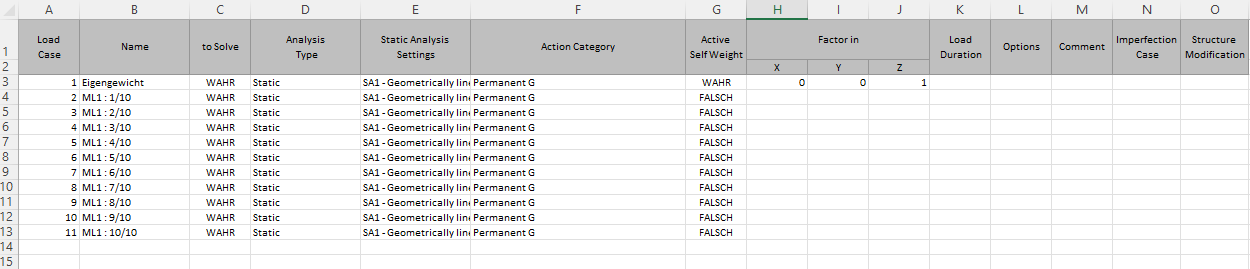
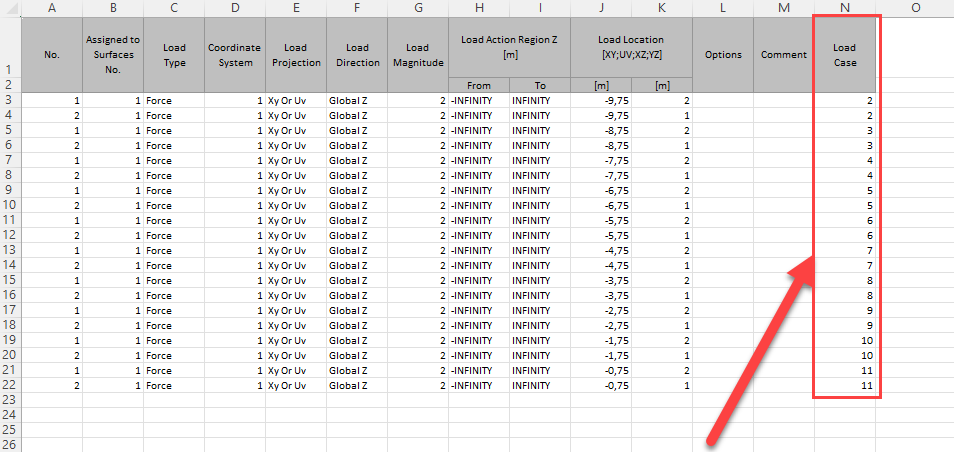
the export can be performed for all load cases at once (Image 1). Afterwards, you can include the loads for each load case, and you can export load types for all load cases simultaneously. For example, in my model the free concentrated loads are exported for LC 2–11, corresponding to the load cases generated by the Load Wizard (Image 2).
For loads that are not free, you can check the corresponding elements, such as lines or surfaces. These loads are linked to the respective elements and may need to be adjusted manually.
Image 1:
Image 2: