Options for transferring new RFEM6 files to an older program version

Good day,

I wanted to ask what options there are to open or modify RFEM6 files from a newer program version in an older one.

In my company, the same software version is installed on all computers and updating is not simply allowed. Unfortunately, our allocated RAM, CPU, and GPU are limited (all PCs are basically cloud computers from a data center). For this reason, and due to the constant latency caused by working in a cloud (Omnisaa / VMware Horizon), I decided to use RFEM on my private laptop. This initially saved me not only hours of calculation time but also allowed me to work more smoothly in general and even run Revit and RFEM on two different computers.

What initially seemed like a brilliant efficiency boost in the first weeks has now turned into a small disaster, as all files on the company network cannot be opened. First, a warning about the version mismatch appears, then a message: "the file is corrupted," and this happens with every file. On the private computer, every file still runs smoothly. At first, the import and export via the Excel add-in seemed promising, but here I also have to wait for permission for the add-in. What other options could I use? Is it possible to install version 6.11.0003 on my private computer? Then I could first export from 6.11.0006 on the computer that has the add-in, then open 6.11.0003, import there, and then send the file from 6.11.0003 to the company network. Unfortunately, in the extranet, I only find options to download older versions in steps of 6.X.

I would be very pleased to receive feedback,

Best regards,

Nick Böttcher
I can confirm the problem. It is partially not possible to open data from version 6.10.xxxx with 6.10.yyyy > error message or crash.

Hi DeflectionPerfection,

Complete backward compatibility is generally not guaranteed. Therefore, it should be ensured that everyone within the company works with the same version.

Currently, RFEM tries to open files from newer versions (with a warning). However, due to new implementations, there are objects included that it cannot handle, which causes the error message that the file is corrupted.
If older versions are to read all new objects, the older versions would also have to be updated regularly.
Due to the frequent updates of the RFEM version, we can quickly provide new features and bug fixes to customers. In this respect, a compromise is necessary here.

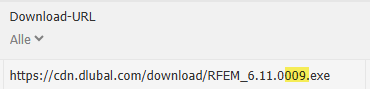
To install version 6.11.0003, you can adjust the download URL in the Extranet to the corresponding version number and open it in the browser:

image

To export an already created model from 6.11.0006 to 6.11.0003, most model and load data can be imported via the SAF format.

I look forward to feedback or further comments on the topic

Best regards
Paul Sivolgin

1 Like

@paul.sivolgin
This statement used to apply to version jumps like RFEM 6.05 to 6.06.
In larger companies, it is not feasible to roll out new versions weekly with more than 1.5GB, as quality standards must also be maintained and each program version must first be verified.
The current Dlubal philosophy also complicates collaboration with external offices. It is unrealistic for all project participants to synchronize their RFEM versions every week.

The currently proposed solution is not practical.

1 Like

Yes, that describes the problem in my/our case very well!

Tips from my side for the following cases:

Case 1 (the child has already fallen into the well, the static/model is basically finished in the new version and now has to be opened in an older version of the company)

=> here I used the Excel add-in (can be installed without admin rights), so you can first export most of the data in the new version to an Excel file, send the Excel file to the company network, then import most of the data with the Excel add-in in the company, which already saves a lot of geometry, loads, and much more

WARNING! Not everything is transferred using the Excel add-in; the following problems occur (at least for me):

Rod supports are partially not or incorrectly imported/exported;

All inputs from various load assistants are partially not or incorrectly imported/exported.

The imperfection directions can be swapped.

All nodes on rods or nodes on lines suddenly lie at the same place after export (best to fix this first so that the geometry is correctly displayed again and many things adjust properly).

Steel connections are not imported or exported.

Pay special attention: result combinations are imported and exported, but assigned load cases (LKs) are lost.

Eccentricities of line loads must be reset (lost during Excel import/export).

... There may be more things that need reworking which I have not listed here, but this is what I noticed in my last recovery process.

Case 2 (company computer/network has disproportionately poor performance and not the latest version, work is to be done with another device):

On the computer where modeling is done, first download/use an even older version and then send this file to the company network; older files can (so far) always be opened without errors and without needing rework.

Regarding 1) Input data from addons must be re-entered. (Steel design)

1 Like

Hello @Flo6000,

I completely understand that the weekly updates are a challenge for some IT departments.

What speaks against not rolling out every RFEM version in the company network, but for example only distributing a new version every 4 or 8 weeks?

Is the data volume during an update really a problem? In a company network, it should actually not be a problem to distribute such a package via Group Policies. I can only imagine that if many employees work from home and their internet connection is poor, bottlenecks can occur.

One thing we must not forget: The fast update cycle has the advantage that we can react very quickly to customer problems.

A few more thoughts on the problems with file compatibility:

Currently, the development of RFEM is progressing very quickly. On the one hand, this is good because new functions become available quickly. The downside, however, is that the compatibility of the files suffers. New developments often require an adjustment of the data structure. So new tables are created in the SQLite database or existing ones are changed. If an older version encounters entries in the database that it cannot handle, then there is a problem. This manifests itself in the message that the file is corrupted.

One possible solution might be to merge user stories that require a change in the file format in bundles. This would not eliminate the problem 100% but would mitigate it.

I will discuss the topic with the responsible developers.

Have a nice weekend
Frank

1 Like

Hello Frank,

thank you for your response.

Here, Dlubal actually completely overlooks the effort involved in the verification process of the construction software.
You cannot simply roll out a software version every 4-8 weeks, since as users we are liable for the errors in the software ourselves.
It should also be known that updates regarding data volume can be designed much better if one wants to!

Compatibility:
With RFEM5 there were 2 to 3 major updates per year, which everyone could “live with” and collaboration with other versions was not a problem.

RFEM6 has now been on the market for 4 years and since 2021, 178 versions of RFEM6 alone have been released. (These are only the main versions that can be found on the extranet).

A merge of files via user stories might be a good idea in individual cases, but in practice it is usually not feasible because deadlines are usually very tight and you cannot wait for a merge.

Best regards
Flo

Curious question: What exactly does the verification process look like? Could you please describe it a bit.

What timeframe would be ideal for you?

Yes, that is known, but for what problem would that be the solution? I can't imagine that copying 2.5GB over the local network is a problem.

Well, there were indeed a few more RFEM 5 versions per year. ;-)

What speaks against verifying and distributing the current RFEM 6 version 2 to 3 times a year within the company?

Best regards
Frank

Hello Frank,
attached are my answers to your questions.**

Regarding the verification process:**
In the course of updates or larger upgrades, the software is installed for testing by a key user group, depending on whether the new feature should be adopted and compatibility with other systems is still ensured. This can take 1 to 2 weeks including coordination and installation. Including a test period of 2 weeks and possibly bug fixes, we are looking at around 4 weeks until the update is rolled out. With new versions every 4 to 8 weeks, verification would run continuously. This always carries the risk of encountering new errors during productive operation.
Update interval:
Smaller developments as well as corresponding summary release notes that occur 1 to a maximum of 2 times a year are realistically implementable and, after extensive testing phases, also deliver reliable results on which (as well as on the scope of functions) one can rely. Necessary patches in the form of bug fixes or urgent adjustments are naturally unaffected by this.
Compatibility:
2 to 3 updates per year already represent the upper limit and are still justifiable. More verifications are only time-consuming and not economical with constantly new versions appearing. Summarizing developments and focusing on larger releases would definitely create added value for operational business.
Of course, this must not be an isolated solution for individual companies, as for meaningful collaboration all partners must be on the same version.

Best regards
Flo

Hello Flo,

thank you very much for your response. These are very interesting insights into the IT of larger companies for me. The processes differ significantly from those in smaller offices.

I would like to briefly describe where I see the problems in a half-year cycle for feature updates.

The development of RFEM 6 is currently progressing very quickly, much faster than ever in RFEM 5. With a half-year cycle, users would be confronted with major changes from version to version. Not everyone may like that.

We try to release features in a very early state to get feedback from users and then incorporate that back into development (see Add-On Components). Something like that would be almost impossible.

We would more often face the dilemma that a function a user is urgently waiting for is finished, but we could only deliver it with the next feature release. One solution for this would be to introduce a beta branch. Only then would we have three branches to maintain: the stable branch, the beta branch, and the development branch.

It would then become problematic with bug fixes. If a bug were discovered in the stable version, it would have to be fixed and tested in 3 branches. That is time-consuming. Ultimately, fewer bugs would be fixed and software quality would suffer.

I fear we will not find a solution that is ideal for all customers. As you know, our customers are very heterogeneous. Despite all the problems, which I do not want to downplay at all, in my opinion the current system with the rapid progression of versions is the best among all bad compromises.

I wish you a nice weekend.

Frank