Hello everyone,
How can I access the parameters under the cross-section tab 2 of a gable roof beam via the RFEM 6 API?
I currently assume that I am in the right place in C# with the command of the "CurvedMemberParametersTreeTable". However, I cannot find the correct designation in the "CurvedMemberParametersTreeTableRow" with which I can control the values of the table accordingly.
How can I find the correct key assignments for different cross-section distribution types?
Thank you very much for the help!
Hello everyone,
I have meanwhile initiated an export via an existing webinar (Webinar | Concrete design with the Dlubal API) in order to read out the table data accordingly.
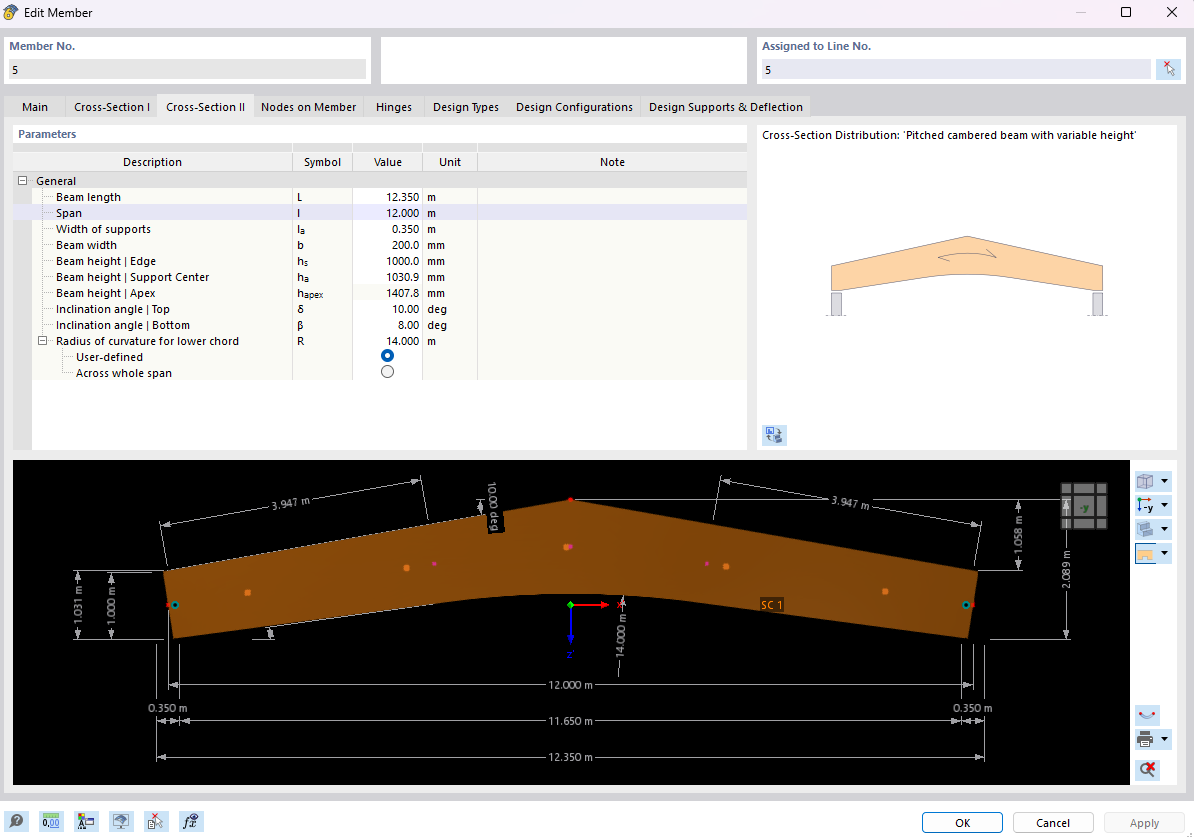
-> CAPTION: 'General' | KEY: '' | SYMBOL: '' | VALUE: 0
-> CAPTION: 'Beam length' | KEY: '' | SYMBOL: 'L' | VALUE: 12.350000000000001
-> CAPTION: 'Span' | KEY: '' | SYMBOL: 'l' | VALUE: 12
-> CAPTION: 'Width of supports' | KEY: '' | SYMBOL: 'l<sub>a</sub>' | VALUE: 0.35
-> CAPTION: 'Beam width' | KEY: '' | SYMBOL: 'b' | VALUE: 0.2
-> CAPTION: 'Beam height | Edge' | KEY: '' | SYMBOL: 'h<sub>s</sub>' | VALUE: 1
-> CAPTION: 'Beam height | Support Center' | KEY: '' | SYMBOL: 'h<sub>a</sub>' | VALUE: 1.0309
-> CAPTION: 'Beam height | Apex' | KEY: '' | SYMBOL: 'h<sub>apex</sub>' | VALUE: 1.4077975373700125
-> CAPTION: 'Inclination angle | Top' | KEY: '' | SYMBOL: 'δ' | VALUE: 0.17453292519943295
-> CAPTION: 'Inclination angle | Bottom' | KEY: '' | SYMBOL: 'β' | VALUE: 0.13962634015954636
-> CAPTION: 'Radius of curvature for lower chord' | KEY: '' | SYMBOL: 'R' | VALUE: 14
-> CAPTION: 'User-defined' | KEY: '' | SYMBOL: '' | VALUE: 1
-> CAPTION: 'Across whole span' | KEY: '' | SYMBOL: '' | VALUE: 0
Unfortunately, after this output, the key ' ' is always empty, so I cannot access the parameters. Is this simply not currently available in the API?
I would greatly appreciate any feedback :)
Here is the window from RFEM with the parameter table:
Hello @Marcel,
I was also able to identify the problem and have forwarded it to the developers for resolution.
Best regards,
Rebecca Göbel
Hi Marcel,
Quick answer: the empty key is expected here. For the cross-section distribution parameters the API only fills in caption and symbol — not key — so you can't look them up by key.
The easy fix is to use symbol as the identifier instead. Two things to know:
- The symbols carry a little HTML (la, δ), so clean that first.
- Values come back in SI base units: lengths in metres and angles in radians (e.g. δ = 0.1745 rad = 10°), so convert the angles if you want degrees.
import re, html, math

def clean(sym):
    sym = re.sub(r"<sub>(.*?)</sub>", r"_\1", sym or "")
    sym = re.sub(r"<.*?>", "", sym)
    return html.unescape(sym).strip()

params = {}
for r in rows:                     # the rows you're already iterating
    s = clean(r.symbol)
    if s:
        params[s] = r.value

for a in ("δ", "β"):                  # radians -> degrees
    if a in params:
        params[a] = math.degrees(params[a])

# params -> {'L':12.35,'l':12,'l_a':0.35,'b':0.2,'h_s':1.0,
#            'h_a':1.0309,'h_apex':1.4078,'δ':10.0,'β':8.0,'R':14.0}
Two small notes:
- The table is a little tree — a few rows are options without a symbol (e.g. under “Radius”: “User-defined” = 1, “Across whole span” = 0). The loop above skips those; if you need them, just read them by their caption.
- Don’t key on
caption — it’s translated and changes with the RFEM language, while symbol stays the same.
If you really need the key column populated for this object, it’s worth a short note to Dlubal support with your RFEM 6 version.
Hope that helps!
Best,
Abdelrahman Refaie