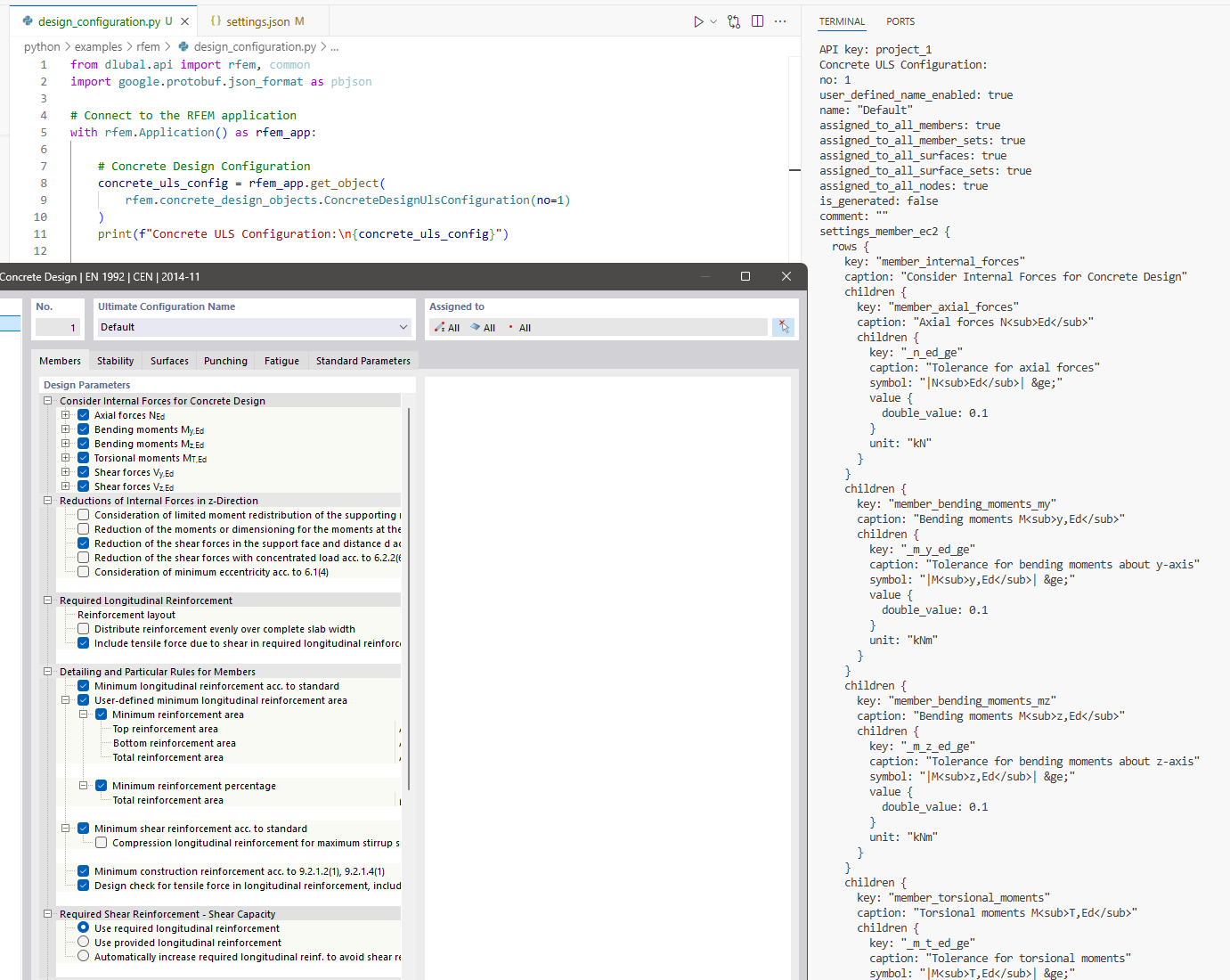
RFEM6 API II PYTHON | Punching Shear Nodes

Hi,

I am having a bit of trouble with assigning nodes for punching shear design using the api. I have been referring to Node — Dlubal API documentation and ConcreteDesignUlsConfiguration — Dlubal API documentation

When I create the nodes I want punching shear check on I have:

        objects.append(
            rfem.structure_core.Node(
                no=center_tag,
                coordinate_1=x_rot,
                coordinate_2=y_rot,
                coordinate_3=base_z,
                punching_design=True,  # Enable punching shear design for this node
                concrete_design_ultimate_configuration=10,  # Assign to ULS configuration
            )
        )

When I create the concrete design uls configurations I have:

uls_cfg = rfem.concrete_design_objects.ConcreteDesignUlsConfiguration(
        no=10,
        name="ULS Config",
        assigned_to_all_surfaces=False,
        assigned_to_all_surface_sets=False,
        assigned_to_surfaces=[surfaces["footing_surface"]],
        assigned_to_nodes=assigned_nodes,
    )

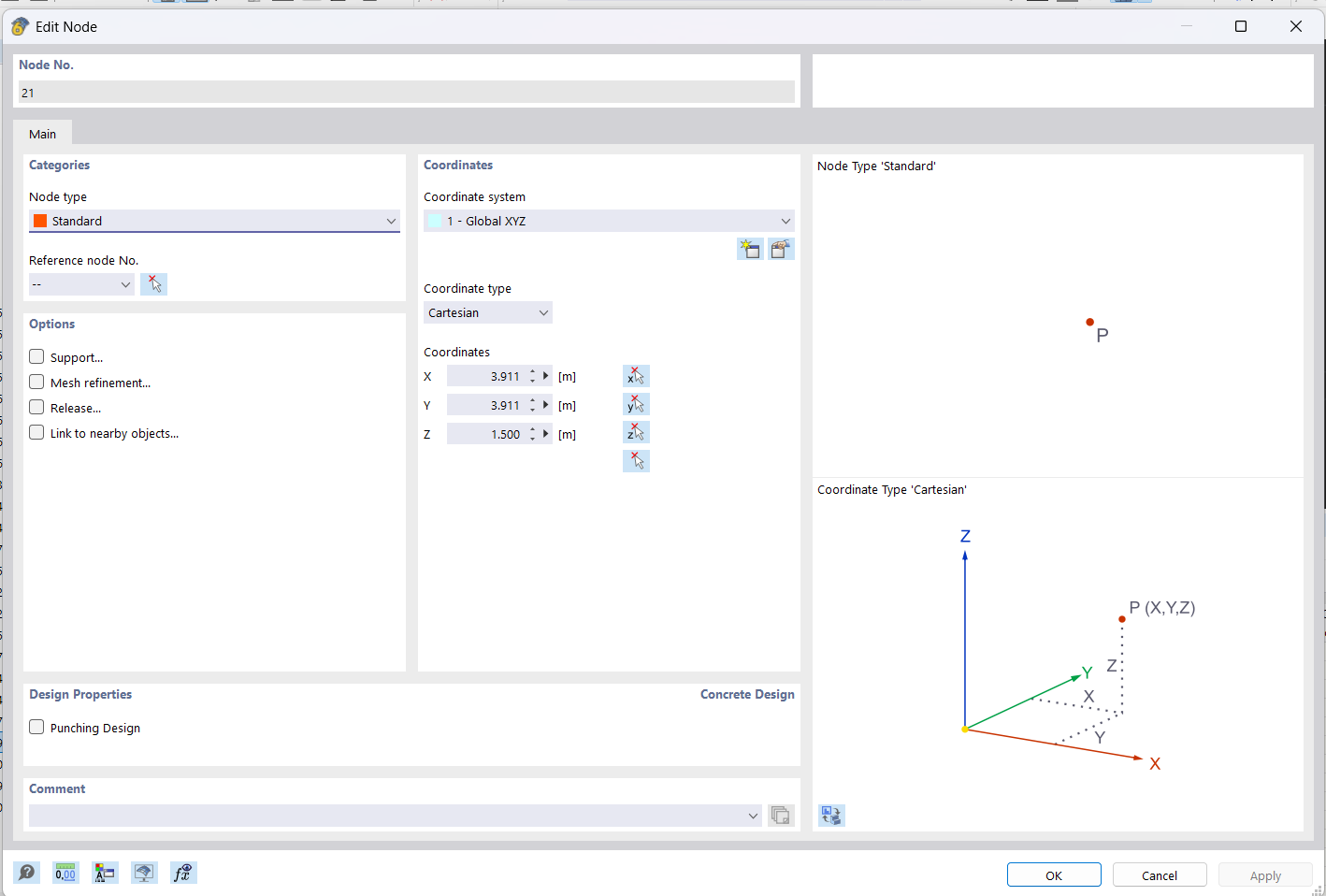
But then once the model setup is done, when I look at the result in the ui the punching design for the node is not checked:

And then in concrete design inputs under Ultimate Configurations the nodes aren't showing up either
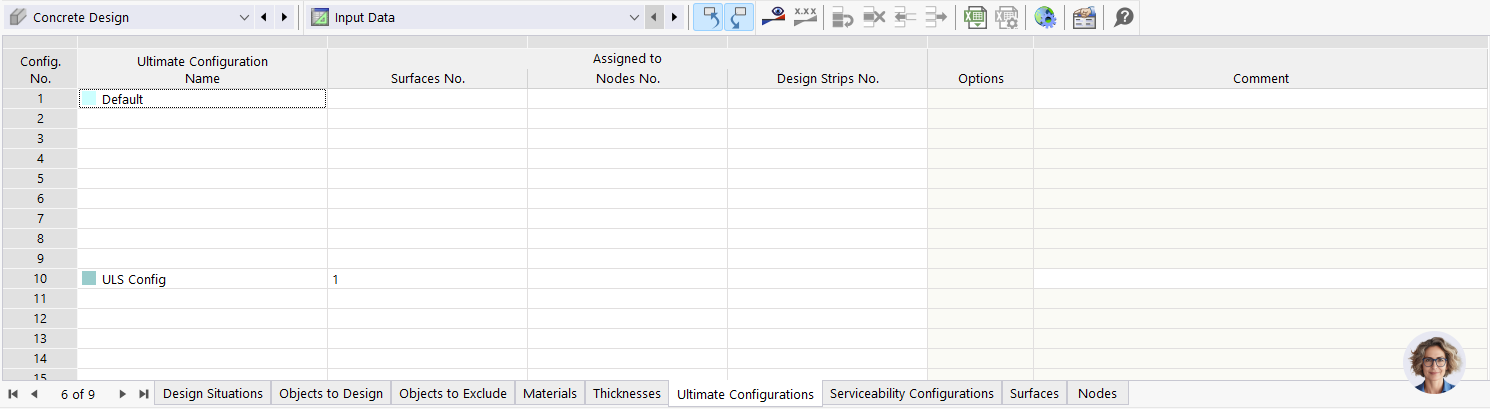
I have a fair bit of logging in the code so I'm pretty sure I'm doing it to the right node.

2025-07-26 20:42:38 [INFO] infrastructure.rfem_api.foundation.geometry.nodes - Created center node 21 for base plate 1 at (3.911, 3.911, 1.500) with punching design enabled and assigned to concrete design configs
2025-07-26 20:42:38 [INFO] infrastructure.rfem_api.foundation.reinforcement.reinforcement_setup - === PUNCHING SHEAR SETUP ===
2025-07-26 20:42:38 [INFO] infrastructure.rfem_api.foundation.reinforcement.reinforcement_setup - Base plate center nodes dictionary: {1: 21, 2: 22, 3: 23, 4: 24}
2025-07-26 20:42:38 [INFO] infrastructure.rfem_api.foundation.reinforcement.reinforcement_setup - Extracted assigned_nodes list: [21, 22, 23, 24]
2025-07-26 20:42:38 [INFO] infrastructure.rfem_api.foundation.reinforcement.reinforcement_setup - Number of nodes for punching shear: 4
2025-07-26 20:42:38 [INFO] infrastructure.rfem_api.foundation.reinforcement.reinforcement_setup - Node numbers for punching shear: [21, 22, 23, 24]
2025-07-26 20:42:38 [INFO] infrastructure.rfem_api.foundation.reinforcement.reinforcement_setup - === CREATING ULS CONFIGURATION ===
2025-07-26 20:42:38 [INFO] infrastructure.rfem_api.foundation.reinforcement.reinforcement_setup - ULS config - assigned_to_nodes: [21, 22, 23, 24]
2025-07-26 20:42:38 [INFO] infrastructure.rfem_api.foundation.reinforcement.reinforcement_setup - ULS config - assigned_to_surfaces: [1]

Any ideas what I am doing wrong?

And then I have a non-coding question on punching design.

In the UI when I manually check the boxes in the 4 nodes to enable punching design, and run the concrete design I get the error "One or more nodes have a dimensionless node load. Punch calculation is not allowed."

I have the node on the center of a load transfer surface which simulates a base plate (still unsure if I should make this a rigid surface (another question I suppose - I have tried both and the max contact stress is 255.79 kPa for load transfer compared to 255.85 kPa for rigid (so little difference), UL0101.01 (longitudinal reinforcement resistance) design ration is 0.129 for rigid and 0.164 for load transfer - I have read Surfaces | Basic Objects | Structure | RFEM 6 so I sort of understand the theoretical difference but would appreciate advice from the experts!).

From Punching Shear Design in RFEM 6 it says "The concentrated load at these nodes can be introduced by columns, concentrated force, or nodal supports". The load transfer surface has a pressure load of 6090 kPa (2985kN total force) so it warrants a punching shear check, but unsure if rfem6 will check it for a pressure load or if it has to be a node load? The node is an integrated object in both the main (standard) surface and the load transfer surface. Not sure what consitutes a 'concentrated load'.
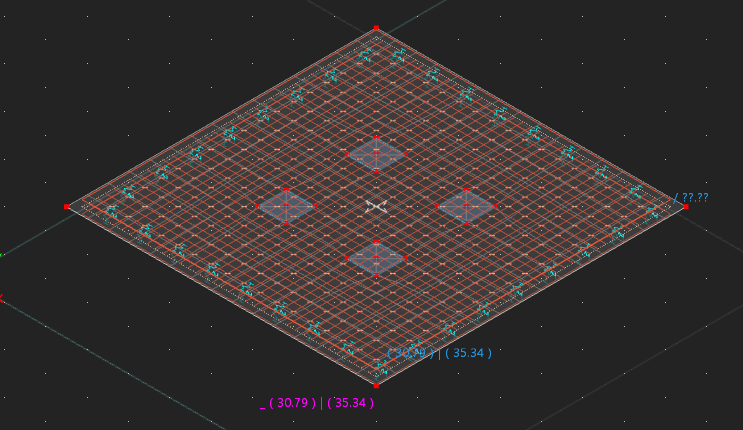
I can email through the model file if that will help :slight_smile:

Sorry for the 3 questions in one post!

Thanks!
Samuel

Hi Samuel,

each topic should focus on one specific question. :blush: Please update your post accordingly, and for any non-API-related questions, kindly create a new topic. Thank you! :folded_hands:

Regarding your API issue, I can confirm that I was able to reproduce the error and have forwarded it to our development team. :rocket: Once there is an update, I will let you know. :+1:

:right_arrow: Mehr Infos: How to Get Quick & Helpful Answers

Regards :slight_smile:
Robert Milrath

1 Like

Thanks Robert!

In the future I'll make sure to stick to one question per post! I have put the non API question on punching shear in this new post:
RFEM6 Punching Shear Nodes Error - Product Support - Dlubal Community

I can't edit my original post (I'm guessing once someone has replied to a post you can't edit it? A Dlubal moderator can feel free to delete everything from "And then I have a non-coding question on punching design." to clean up this thread given that info is now in a new approriate post :slight_smile:

1 Like

Hi Samuel,

Regarding access to Design Configurations: we're currently working on enabling full API support for that functionality. It should be available soon (see preview below) with complete workflow around it to read and modify values in this tree table structure.

As for the punching shear assignment issue: the behavior you're observing is likely related to a known limitation where certain attributes are temporarily read-only in the current model state — this is similar to what we’ve seen with user-defined material properties.

We’re already working on a solution to overcome this, possibly using a fallback mechanism that retries writes internally until the model state allows them. We’ll follow up once it’s resolved or if we need further input from your side.

Let us know if anything changes or if you manage to find a workaround in the meantime.

Best regards,

Thanks for the update Tomas!

I'm think a temporary work around for my case is in my template file (which I copy and edit to create the model) to manually create 4 nodes (give high numbers like 1000,1001,1002,1003 so they never conflict) and random coordinates with the Design Properties check box ticked, and then in prepopulating 1000,1001,1002,1003 in the Assigned to Nodes No for my two concrete design cases. Then in the API I'll just edit the nodes coordinates to put them in the center of the base plates and it should auto integrate them.

I'll probably give this a crack tomorrow and will let you know how I go :)

2 Likes

Hi Tomas,

Following up on your earlier response regarding punching shear assignment — I’ve been revisiting this using the latest RFEM 6 API and wanted to confirm the current workflow and limitations.


Background

Previously, I attempted to set:

punching_design=True
concrete_design_ultimate_configuration=10

directly on nodes during creation, but both fields were read-only (as you mentioned at the time).
Your earlier comment suggested that node-based punching assignment would eventually be controlled through the Design Configuration workflow.


Current Approach (per API docs)

I’m now following the examples from:

The goal is to assign a Concrete Design – ULS Configuration (No. 10) to specific base plate center nodes.

Code (relevant part):

# ------------------------------------------------------------
# Enable punching design for base plate center nodes
# ------------------------------------------------------------
if base_plate_center_nodes:
    try:
        node_nos = [int(n) for n in base_plate_center_nodes.values()]
        uls_no = 10
        uls = rfem_app.get_object(
            rfem.concrete_design_objects.ConcreteDesignUlsConfiguration(no=uls_no)
        )

        if getattr(uls, "assigned_to_all_nodes", False):
            uls.assigned_to_all_nodes = False

        existing = set(int(n) for n in (uls.assigned_to_nodes or []))
        for n in node_nos:
            if n not in existing:
                uls.assigned_to_nodes.append(int(n))

        # Clear tree fields (per Design Configuration example)
        try: uls.ClearField("standard_parameters");       except: pass
        try: uls.ClearField("standard_parameters_tree");  except: pass

        rfem_app.update_object(uls)
        logger.info(f"Assigned {len(node_nos)} nodes to ULS config {uls_no}")

    except Exception as exc:
        logger.error(f"Failed to enable punching design: {exc}", exc_info=True)


Observed Behavior

Logs indicate success:

ULS configuration 10 currently has 0 assigned nodes: []
Updating ULS configuration 10: added 4 new nodes (now 4 total)
Successfully enabled punching design: assigned 4 base plate center nodes to ULS configuration 10

…but when re-reading the configuration, or viewing the ULS Config → Assigned to field in RFEM, the node list is still empty.

Also, nodes themselves still have Punching Design unchecked.


What I’ve Realized

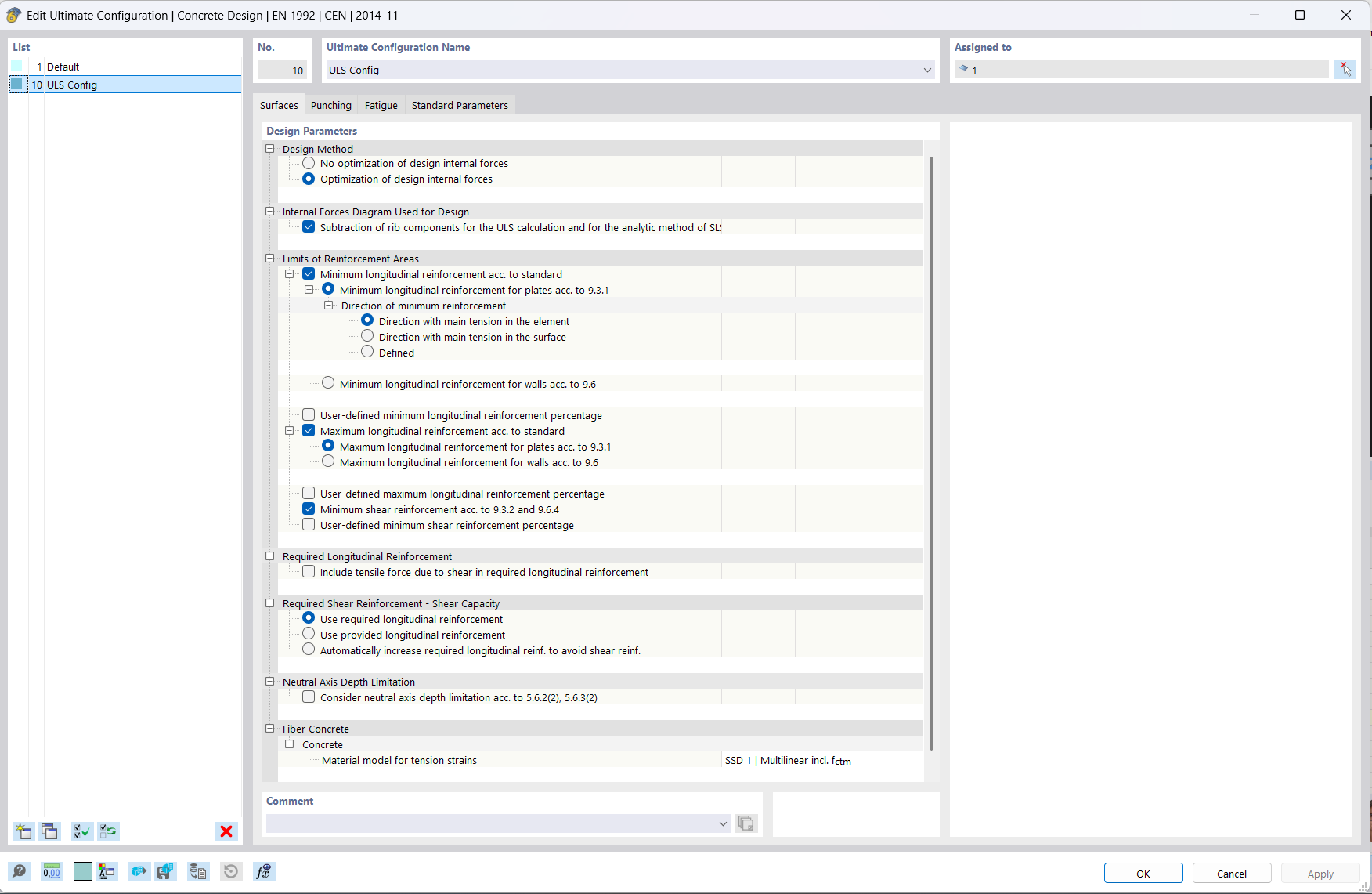
After reviewing the GUI (screenshot attached), I now understand that:

  • The ULS Configuration controls design parameters such as reinforcement limits, shear checks, etc. — it’s equivalent to the dialog shown in Concrete Design → Configurations → Ultimate Configuration.

  • Punching checks, however, appear to be stored separately on the node level (via the Punching Design checkbox), not by assigning a ULS configuration


Questions

  1. ULS Config Assignment
    Is it currently possible to assign nodes to assigned_to_nodes on a ConcreteDesignUlsConfiguration via the API, or is this functionality not yet supported?

  2. Punching Design Assignment
    What is the correct method (or current limitation) for enabling Punching Design on nodes via the API?
    The field punching_design=True is still read-only in recent builds.

  3. Workflow Guidance
    Should the punching design checkbox be set when creating the node, or will it be controlled through the Concrete Design module once implemented?


Environment
RFEM 6.12.05 (64-bit)
Concrete Design add-on (EN 1992 – Eurocode 2)


Thanks again for your help — I’d appreciate clarification on whether these two assignments (ULS configuration vs. punching design) are now supported in the API, and any recommended workarounds until full write access is implemented.

Hi Samuel,

I quickly tested the functionality on a simple model of a base plate (model attached), where I tried adding a new ‘punching’ node and assigning it to a new concrete design configuration. Both required functionalities seem to be working correctly on this simple case.

Here’s the code snippet I used for the test:

from dlubal.api import rfem

with rfem.Application() as rfem_app:

    rfem_app.create_object(
        rfem.structure_core.Node(
            no=5,
            coordinate_1=1.524,
            coordinate_2=1.524,
            coordinate_3=0,
            punching_design=True,
        )
    )

    rfem_app.create_object(
        rfem.concrete_design_objects.ConcreteDesignUlsConfiguration(
            no=2,
            name="ULS Config",
            assigned_to_all_surfaces=False,
            assigned_to_all_surface_sets=False,
            assigned_to_surfaces=[1],
            assigned_to_nodes=[5],
        )
    )

Can you try running this on your end and let us know if anything might be wrong with your implementation or if you're encountering issues (using 6.12.0005)?

Looking forward to your feedback.

Best regards,

punching_shear.rf6 (1000.8 KB)

This turns out to be a bit of an interesting one! (albeit a painful one as it took 2 hours for me too figure out…)

I downloaded your model and used that code and it created node 5 with the punching shear checked, and the concrete design ULS2 with node 5 assigned no problems.

My code uses almost the exact same logic, as shown below:

# Create center nodes for each base plate for punching shear design
    center_node_start = node_tag
    for leg in tower_leg_coords:
        leg_no = leg["leg_no"]
        cx, cy = leg["x_coord"], leg["y_coord"]
        theta = math.radians(angle_deg)

        # Center point is just the leg coordinate (already in correct position)
        x_rot = cx
        y_rot = cy
        
        center_tag = center_node_start + (leg_no - 1)  # Sequential numbering for center nodes
        objects.append(
            rfem.structure_core.Node(
                no=center_tag,
                coordinate_1=x_rot,
                coordinate_2=y_rot,
                coordinate_3=base_z,
                punching_design=True,  # To Do # Enable punching shear design for this node
            )
        )
        base_plate_center_nodes[leg_no] = center_tag
        logger.info(
            "Created center node %d for base plate %d at (%.3f, %.3f, %.3f) with punching design enabled and assigned to concrete design configs",
            center_tag, leg_no, x_rot, y_rot, base_z
        )

and then later:

# Concrete Design configurations (ULS & SLS) – assign to footing surface and base plate center nodes
    assigned_nodes = []
    if base_plate_center_nodes:
        assigned_nodes = list(base_plate_center_nodes.values())
        logger.info(f"=== PUNCHING SHEAR SETUP ===")
        logger.info(f"Base plate center nodes dictionary: {base_plate_center_nodes}")
        logger.info(f"Extracted assigned_nodes list: {assigned_nodes}")
        logger.info(f"Number of nodes for punching shear: {len(assigned_nodes)}")
        logger.info(f"Node numbers for punching shear: {assigned_nodes}")
    else:
        logger.warning("No base_plate_center_nodes provided to create_reinforcement_setup")
    
    logger.info(f"=== CREATING ULS CONFIGURATION ===")
    logger.info(f"ULS config - assigned_to_nodes: {assigned_nodes}")
    logger.info(f"ULS config - assigned_to_surfaces: {[surfaces['footing_surface']]}")
    uls_cfg = rfem.concrete_design_objects.ConcreteDesignUlsConfiguration(
        no=10,
        name="ULS Config",
        assigned_to_all_surfaces=False,
        assigned_to_all_surface_sets=False,
        assigned_to_surfaces=[surfaces["footing_surface"]],
        assigned_to_nodes=assigned_nodes,
    )
    objects.extend(uls_cfg)

but it didn’t work. I then concluded that the issue must be that my code generates everything at once (IE I append the nodes, surfaces, then the concrete design uls configuration to minimise api calls), where as you have an existing surface, then create a node, then create a config.

So after adding everything to the model, just before calculation I added

            # ------------------------------------------------------------
            # Create ULS configurations and a punching-design node (per user request)
            # ------------------------------------------------------------
            try:
                logger.info("Creating ConcreteDesignUlsConfiguration no=2 assigned to surface 1 and nodes [5, 6, 7, 8]")
                rfem_app.create_object(
                    rfem.concrete_design_objects.ConcreteDesignUlsConfiguration(
                        no=2,
                        name="ULS Config",
                        assigned_to_all_surfaces=False,
                        assigned_to_all_surface_sets=False,
                        assigned_to_surfaces=[1],
                        assigned_to_nodes=[5, 6, 7, 8],
                    )
                )

                logger.info("Creating Node no=50 at (7.315, 58.024, 2.0) with punching_design=True")
                rfem_app.create_object(
                    rfem.structure_core.Node(
                        no=50,
                        coordinate_1=7.315,
                        coordinate_2=58.024,
                        coordinate_3=2,
                        punching_design=True,
                    )
                )

                logger.info("Creating ConcreteDesignUlsConfiguration no=3 assigned to surface 1 and node [50]")
                rfem_app.create_object(
                    rfem.concrete_design_objects.ConcreteDesignUlsConfiguration(
                        no=3,
                        name="ULS Config",
                        assigned_to_all_surfaces=False,
                        assigned_to_all_surface_sets=False,
                        assigned_to_surfaces=[1],
                        assigned_to_nodes=[50],
                    )
                )
            except Exception as exc:
                logger.error("Failed to create requested ULS configurations or punching node: %s", exc, exc_info=True)

and node 50 was created on the surface with the punching shear checked and Concrete Design ULS 3 had node 50 assigned!

So then I realised that was the issue (as well as maybe my order as I was creating all my nodes, then the surfaces).

So I changed to to add to my all objects that is created in the set order or nodes to create the surface, the surface, the base plate nodes (for punching on the surface), and then adding the concrete design uls config.

Then the nodes successfully had the punching design box checked, but the concrete design uls config didn’t have them assigned.

So then I had a seperate api call to create the concrete design and then everything worked!

Just putting my working and final findings here so hopefully it saves someone a headache in the future :slight_smile:

1 Like

Thx Samuel for nice summary, it’s just proven, that still it a bit depands on the order, the model objects are created. Great to having you here :ok_hand:

1 Like